L2 Cache vs VRAM: How GPU Memory Hierarchy Works
Introduction
GPU L2 cache and VRAM both help supply data to the graphics processor, but they serve different roles. VRAM is the larger external memory pool that stores graphics resources and compute data. L2 cache is a smaller, faster on-chip memory structure that retains selected data so the GPU can access it without repeatedly reaching external memory. Understanding the hierarchy explains why two GPUs with similar VRAM bandwidth can behave differently in real workloads.
A GPU specification is most useful when it is connected to a real workload. Gaming, rendering, video production, and AI inference place different demands on memory capacity, bandwidth, cache, and compute resources. This article explains the underlying concepts, describes how they interact, and offers a practical way to interpret specifications without treating one number as a complete performance prediction.
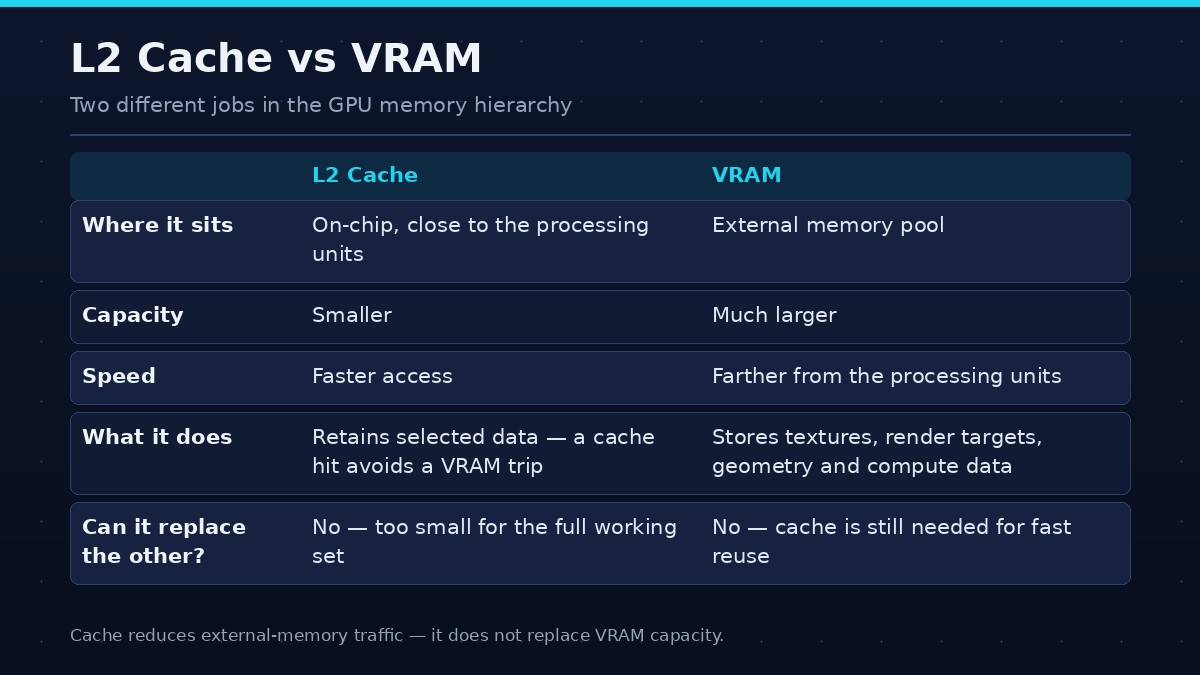
| Aspect | L2 cache | VRAM |
|---|---|---|
| What it is | Smaller, faster on-chip memory | Larger external memory pool |
| Role | Keeps selected data close to GPU processing units; reduces external-memory traffic | Stores large working datasets — textures, render targets, geometry, model weights |
| Limit | Cannot hold every texture, model weight, or project resource | Farther from the processing units than cache |
Quick answer
VRAM stores large working datasets, while L2 cache keeps selected data closer to GPU processing units. Cache can reduce external-memory traffic, but it does not replace the capacity of VRAM.
The foundations
A modern graphics processor works with data that must be stored, fetched, transformed, and reused. Some data is accessed repeatedly; other data is needed only for a short rendering or compute stage. Memory controllers, caches, compression, and scheduling help manage these flows. The result is a hierarchy rather than one undifferentiated pool. Local VRAM provides high-throughput storage, caches keep selected data closer to compute units, and system memory can support some workloads through platform-managed pathways.
Capacity and bandwidth should be separated. Capacity determines how much data can remain resident. Bandwidth determines the rate at which data can be transferred. Cache can reduce external-memory traffic when access patterns allow reuse, but it does not replace the need for adequate capacity or bandwidth. The GPU's compute architecture determines how quickly it processes the data after it arrives.
Where L2 cache fits
Modern GPUs use a hierarchy of caches and local memory. L1 or other local caches may sit close to compute units, while L2 is commonly shared more broadly across parts of the GPU. Exact organization differs by architecture. Cache stores copies of selected data and is managed by hardware and software policies.
What VRAM does
VRAM provides the larger storage pool for textures, render targets, geometry resources, and compute data. It has much greater capacity than on-chip cache but is farther from the processing units. External memory bandwidth is high, yet cache can reduce how often the GPU needs to access it.
Cache hits and misses
A cache hit occurs when requested data is found in the cache. A cache miss requires the data to be fetched from a lower level in the hierarchy, potentially external memory. Workloads with repeated access to nearby or reusable data can benefit from cache. Workloads with large, scattered, or rapidly changing data may see fewer hits.
Why larger cache can help
A larger cache may retain more useful data and reduce external-memory traffic for certain access patterns. This can improve effective bandwidth or reduce latency. However, the benefit depends on the workload and cache design. A larger cache does not guarantee that every game or compute task becomes faster.
Why cache cannot replace VRAM
Cache is much smaller than the graphics card's external memory. It cannot hold every texture, model weight, or project resource. When data does not fit in cache, the GPU still needs VRAM or another memory path. Cache improves access efficiency; it does not create additional capacity for the full working set.
Cache, compression, and bandwidth
Cache behavior interacts with memory compression and external bandwidth. Compression may reduce traffic for supported data, while cache may prevent repeated reads of the same data. These mechanisms can make a GPU with a narrower bus perform competitively in some workloads. Their benefits vary and should be evaluated with real applications.
How to compare cache specifications
Check the exact architecture and official product documentation. Cache sizes across GPU generations are not directly comparable without considering organization, latency, bandwidth, compression, and workload. Use independent benchmarks to understand how the complete design performs.
How to evaluate the specification in practice
Begin with the exact GPU model and official product specification. Record memory capacity, memory type, bus width, effective data rate, stated bandwidth, cache information where available, and the architecture generation. Then identify the application and workload. A game at 1080p is not the same memory workload as a 4K game, a large 3D scene, or an AI model with a long context window.
Use benchmarks that match the intended task. For gaming, look for the same resolution, settings, game version, and comparable CPU platform. For AI, check model, quantization, framework, batch size, context, and runtime. For rendering or creator workloads, use project sizes and software versions representative of your own work. Synthetic bandwidth tests can describe a narrow aspect of the memory subsystem, but they do not replace application tests.
When comparing two cards, note whether they differ in more than one specification. If one has a different GPU chip, core count, power limit, cache design, or memory capacity, the observed performance gap cannot be attributed to one factor alone. Transparent comparisons identify the complete product and explain what the test can and cannot establish.
Common misconceptions
A larger capacity does not necessarily mean higher frame rates. A wider bus does not always mean a faster GPU. A newer memory generation does not automatically outperform every older implementation. Cache size cannot be compared without considering architecture and access behavior. Manufacturer peak bandwidth is not the same as the effective bandwidth achieved in every application.
Avoid adding dedicated VRAM and shared system memory together as if they were one equally fast pool. Also avoid assuming that a monitoring tool's allocation figure is the minimum memory required by the current workload. These misunderstandings can lead to poor buying decisions and misleading technical content.
Frequently asked questions
Is L2 cache the same as VRAM?
No. L2 is a smaller on-chip cache; VRAM is the larger external memory pool.
Does more L2 cache increase FPS?
It can help workloads that benefit from cache reuse, but the effect varies by game and GPU architecture.
Can a GPU run without VRAM if it has L2 cache?
No. Cache is far too small to replace the main graphics memory pool.
Does L2 cache reduce memory bandwidth needs?
It can reduce external-memory traffic when requested data is found in cache.
Should I compare GPUs by cache size?
Cache size is useful context, but architecture, bandwidth, capacity, compute resources, and benchmarks matter too.
Conclusion
Think of VRAM as the GPU's main local storage and L2 as a fast nearby cache. Both matter, but they solve different problems.
The best interpretation of a GPU specification combines the hardware design with the workload and independent measurements. Use manufacturer documentation for exact specifications, understand what each metric represents, and compare complete systems under consistent conditions. That approach turns technical numbers into useful buying and engineering decisions.