
Why Mods Eat So Much VRAM
Vanilla Skyrim Special Edition is a light game by modern standards. Maxed out at 1080p, it uses around 2 GB of VRAM, and the original 2011 release used closer to 1 GB. Mods change everything. A single 4K texture pack replaces hundreds of small textures with huge ones, and the game loads every one of them into VRAM. Add an ENB lighting overhaul, a foliage mod and a city expansion, and the same game that needed 2 GB can suddenly ask for 14 GB or more.
The reason is simple. A 4K texture is 4096 by 4096 pixels, sixteen times the pixels of a 1K texture, and it takes roughly sixteen times the memory. Skyrim loads the full texture into VRAM no matter what resolution your monitor is, so a 4K pack costs the same VRAM on a 1080p screen as on a 4K screen. The visual gain at 1080p is small, but the VRAM bill is full price, the same Ultra textures tax seen in modern games.
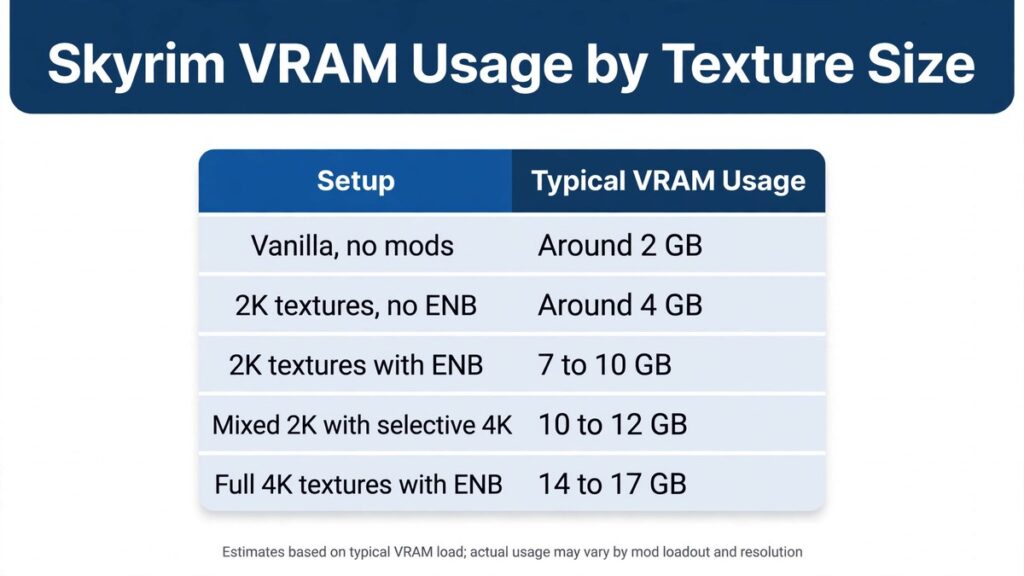
Skyrim VRAM Usage by Texture Size
Community tests and forum reports paint a consistent picture. Lightly modded Skyrim Special Edition with 2K textures sits around 4 GB of VRAM. Push to a full 2K overhaul with an ENB, and usage climbs to roughly 7 to 10 GB in busy areas. Go all-in with 4K textures plus ENB, and players report 14 to 17 GB in dense cities like Whiterun. A single 4K retexture pack on its own can consume 4 GB or more.
| Setup (Skyrim SE, 1080p) | Typical VRAM Usage | Minimum GPU |
|---|---|---|
| Vanilla, no mods | Around 2 GB | Any 4 GB card |
| 2K textures, no ENB | Around 4 GB | 6 GB card |
| 2K textures with ENB | 7 to 10 GB | 12 GB card |
| Mixed 2K with selective 4K | 10 to 12 GB | 12 GB card |
| Full 4K textures with ENB | 14 to 17 GB | 16 GB card or better |
The smart move is the middle of the table. 2K textures deliver around 90 percent of the 4K look at 1080p for roughly half the VRAM, and selective 4K on large surfaces like mountains gives you the best of both worlds. Full 4K everywhere is a luxury for 16 GB and 24 GB cards. When VRAM runs out, the game swaps textures to system memory, and that shows up as stuttering and terrible 1% low frame rates.
What About ENB?
ENB is the other big VRAM eater in Skyrim modding. It adds realistic lighting, depth of field and post-processing, and keeps its own buffers in VRAM on top of the textures. Players report that adding ENB to a 4K setup can cost 20 to 40 percent of frame rate in cities, and on an 8 GB card it is often the difference between smooth play and constant stutter. The rule is straightforward: if you want ENB, budget at least 12 GB of VRAM, and treat 8 GB cards as 2K-without-ENB territory.
Fallout 4 and Fallout 76
Fallout 4 follows the same pattern, only worse, because its open world streams new areas constantly. Modders report 12 GB of VRAM as a practical low end for a heavily modded Fallout 4 setup, with 24 GB recommended for the heaviest texture and weather combinations. The official high-resolution texture pack for Fallout 76 is even more direct: its mod page lists 10 GB of VRAM as the minimum and 16 GB or more as ideal, and warns that VRAM usage will be far greater than Fallout 4 with the same textures. If you mod Fallout games, VRAM matters more than raw GPU speed, because a faster card with 8 GB will stutter where a slower card with 16 GB sails through.
Minecraft Shaders and VRAM
Minecraft looks simple, but shaders turn it into one of the most VRAM-hungry games around. Vanilla Minecraft usually runs in under 2 GB of VRAM. Add a medium shader pack like BSL or Complementary through Iris, and a GTX 1060 6 GB or RX 580 8 GB becomes the comfortable minimum, with 6 GB of VRAM as the baseline. Push to heavy path-traced shaders like SEUS PTGI and you need an RTX 3060 12 GB or RX 6700 XT class card, with 8 GB of VRAM as an absolute must and an RTX 3070 or better for smooth play. At high render distances of 32 chunks or more, even medium shaders want 8 to 12 GB.
| Minecraft Shader Setup (1080p) | VRAM Needed | Example GPU |
|---|---|---|
| Vanilla, no shaders | Under 2 GB | Any modern GPU |
| Light shaders (MakeUp, Nostalgia) | 2 to 4 GB | GTX 1650, RX 6400 |
| Medium shaders (BSL, Complementary) | 6 to 8 GB | RTX 3060, RX 6600 |
| Medium shaders, high render distance | 8 to 12 GB | RTX 4060 Ti 16 GB |
| Heavy shaders (SEUS PTGI) | 8 to 12 GB | RTX 3070 or better |
One warning: shaders and huge modpacks stack. A 12 GB card handles most shader and mod combinations comfortably, while 16 GB is only needed for extreme setups with 600 or more mods plus shaders at high render distance. System RAM matters too, since Minecraft is a Java game, but VRAM decides whether your shader pack runs or stutters.
How Much VRAM Do You Actually Need?
For most modders, 12 GB is the sweet spot. It covers 2K Skyrim with ENB, heavily modded Fallout 4, and medium Minecraft shaders at high render distance. 8 GB is workable if you stick to 2K textures without ENB and medium shaders, but you will manage settings constantly. 16 GB is the comfortable choice for full 4K textures with ENB or 1440p play, and 24 GB is for the extreme end: full 4K everything, heavy ENB presets, and 600-mod Minecraft stacks. When you buy a card for modding, treat VRAM capacity as the first spec on the list, ahead of clock speed and the GPU model itself.
How to Check Your VRAM Usage
Do not guess. Install MSI Afterburner with its on-screen display, or open GPU-Z, and monitor VRAM usage while you play in the busiest area of your game. If usage sits above 90 percent of your card’s capacity, expect stuttering and texture pop-in. The fix order is simple: drop texture resolution one step, disable ENB, then lower render distance. If usage stays under control after those changes, your card is fine and you do not need an upgrade. If it still overflows on 2K textures, that is a genuine VRAM wall, and only a card with more memory will fix it.
Are Mods Legal and Safe?
Yes. Mods are legal community-made content, and they are not cracks or piracy. A texture pack or an ENB preset only changes how a game you already own looks, and it cannot run without the original game installed. Download mods from trusted sources like Nexus Mods, read the comments before installing anything, and avoid repacks or sites that bundle games with cracks. Keep a backup of your saves before installing a big mod list, and add mods a few at a time so you can find the one that breaks something. Modding is safe when you stick to reputable sources and your own legally purchased games.
Conclusion
Mods turn old games into VRAM monsters. Vanilla Skyrim needs around 2 GB, but 2K textures with ENB want 7 to 10 GB, full 4K with ENB can reach 14 to 17 GB, and heavily modded Fallout can use even more. Minecraft shaders follow the same curve, from under 2 GB vanilla to 8 to 12 GB for path tracing. For most modders, 12 GB of VRAM is the sweet spot and 16 GB is comfortable, while 8 GB means sticking to 2K without ENB. Pick your texture size to match your card, and your modded games will stay smooth.