Why Emulation Uses VRAM Differently
Emulation is strange for graphics cards. A PlayStation 3 game was designed for a console with just 256 MB of video memory, yet running it on a PC can use 4 GB of VRAM or more. The emulator does not just run the game, it translates it: RPCS3 converts the PS3’s exotic Cell processor graphics calls into something a modern GPU understands, and that translation work needs memory. Raise the internal resolution from 720p to 1080p or 4K, and every frame buffer, texture and shader cache grows with it. If you are new here, start with our guide on what VRAM is and how it works, because the same rules apply here, just with an emulator in the middle. That is why VRAM for emulation deserves its own guide.
Emulation is mostly a CPU job. The CPU does the hard work of pretending to be a Cell processor or a PowerPC chip, and the GPU only matters when you push resolution, texture packs and visual enhancements. A modest graphics card runs emulators well at native resolution, while 4K upscaling is where VRAM suddenly becomes the limit. The trick is knowing how much VRAM each emulator needs, so you buy the right card.
VRAM by Emulator and Resolution
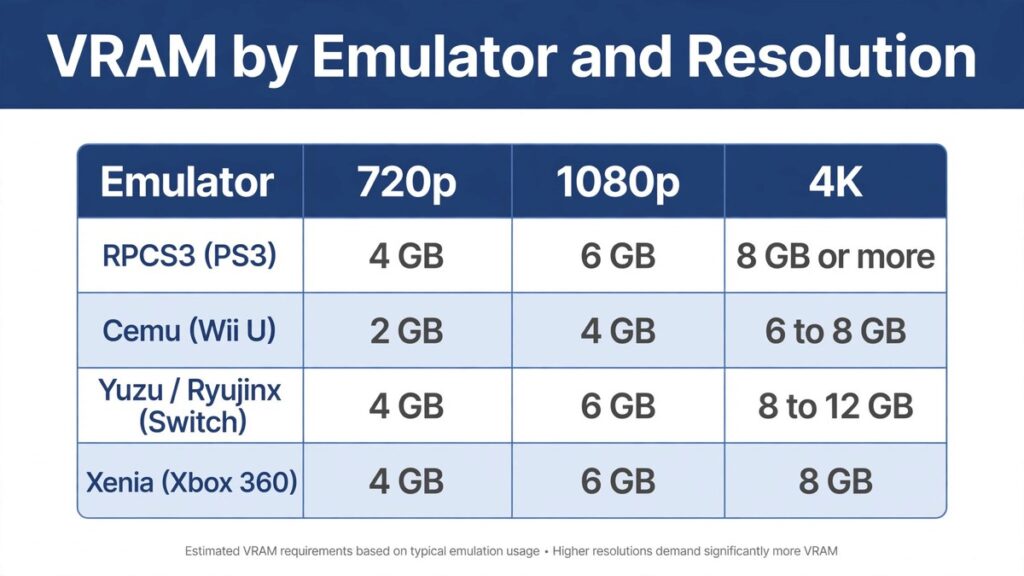
The table below brings together official requirements and community-tested guidance for the four big emulators. RPCS3 is the hungriest, because PS3 games are the most complex to translate. Cemu is the lightest, because the Wii U was a modest console and its emulator is mature. Switch emulators sit in the middle, but their 4K targets are demanding, and Xenia, the Xbox 360 emulator, behaves much like RPCS3.
| Emulator | 720p (Native) | 1080p Upscaled | 4K Upscaled |
|---|---|---|---|
| RPCS3 (PS3) | 4 GB | 6 GB | 8 GB or more |
| Cemu (Wii U) | 2 GB | 4 GB | 6 to 8 GB |
| Yuzu / Ryujinx (Switch) | 4 GB | 6 GB | 8 to 12 GB |
| Xenia (Xbox 360) | 4 GB | 6 GB | 8 GB |
These are practical minimums for smooth play, not the bare minimums to boot a game. RPCS3’s own guidance lists 4 GB as the minimum and 6 GB as recommended, with 8 GB or more for 4K. Cemu needs only 2 GB of VRAM at native resolution, which is why even a decade-old card can run Breath of the Wild at 720p. Switch emulators list 4 GB minimum, 6 GB recommended, and 12 GB optimum for 4K with enhancements. In modern games, the same 4GB vs 6GB vs 8GB VRAM question decides whether you can play at all, and emulation follows the same ladder.
RPCS3: Resolution Scaling Is the VRAM Dial
RPCS3 has one setting that controls almost all of its VRAM usage: Resolution Scale. At 100 percent, games render at their native PS3 resolution, usually 720p. At 150 percent you get roughly 1080p, and at 200 to 300 percent you reach 4K. Community testing shows the VRAM cost scales with it: a game using around 2 GB at 100 percent needs around 3 GB at 150 percent, and demanding games like Red Dead Redemption can exceed 6 GB at higher resolutions. The emulator’s own tiers agree, with an RTX 2060 recommended for standard play and an RTX 4070 listed for the maximum-performance 4K tier.
| RPCS3 Resolution Scale | Output Resolution | Typical VRAM | Example GPU |
|---|---|---|---|
| 100 percent | 720p native | Around 2 GB | GTX 1050 Ti 4 GB |
| 150 percent | Around 1080p | Around 3 GB | GTX 1060 6 GB |
| 200 percent | Around 1440p | 4 to 6 GB | RTX 3060 12 GB |
| 300 percent | 4K | 6 to 8 GB or more | RTX 3060 Ti 8 GB |
Start at 100 percent and raise the scale one step at a time until your frame rate collapses or the game stutters. That is your card’s limit. One important note: RPCS3 is still mostly CPU-limited. If GPU usage sits below 50 percent while the game struggles, your processor is the bottleneck, not your VRAM, and a faster graphics card will not help. Around 80 percent of the PS3 library is now rated Playable, so the emulator itself is rarely the problem.
Cemu: The Lightweight Champion
Cemu is the easiest emulator on your graphics card. A GTX 970 or equivalent is the recommended GPU, and 2 GB of VRAM is enough for native resolution. The magic happens with graphic packs: community packs let you render Breath of the Wild at 4K with sharper textures and unlocked frame rates, and that is when VRAM starts to matter. At 4K with graphic packs, 6 to 8 GB is comfortable, and 16 GB of system RAM is recommended for heavy packs, since the emulator leans on regular memory too. The rule from Cemu’s own documentation is simple: GPU power and VRAM only become important when you raise the internal resolution or chase higher frame rates.
Switch Emulators and Xenia
Switch emulators are more demanding than Cemu because Switch games are newer and more complex. The published requirements are clear: a GTX 1050 4 GB is the minimum, a GTX 1660 6 GB is recommended, and an RTX 3060 12 GB is the optimum for 4K play. That 12 GB optimum is not marketing: at 4K with resolution scaling and texture enhancements, Switch games can use 8 to 12 GB. Xenia, the Xbox 360 emulator, is similar to RPCS3 in appetite, with an RTX 3060 class card recommended for smooth play and 8 GB of VRAM as a sensible 4K target. For all of them, Vulkan is the renderer to use, so any card with current Vulkan drivers works.
Does the CPU Matter More Than VRAM?
Yes. Emulation lives or dies on single-core CPU speed, because the emulator must simulate console processors that work nothing like a PC chip. A Ryzen 5 5600 or Core i5-10400 is the recommended baseline for RPCS3, and the 4K tier wants a Ryzen 7 9800X3D class processor. The right build order is: fast CPU first, 16 GB of system RAM second, then a graphics card with enough VRAM for your target resolution. A 24 GB graphics card on a weak CPU is wasted money in emulation, while a strong CPU with an 8 GB card plays most of the PS3 and Switch libraries at 1080p without trouble.
How to Check Your VRAM Usage
Do not guess. Open MSI Afterburner or GPU-Z, monitor VRAM usage while your game runs, and watch what happens when you raise the resolution scale. If usage climbs past 90 percent of your card’s memory, lower the scale one step or disable texture enhancement packs. If usage stays low but the game still struggles, your CPU is the limit. This one test tells you exactly which part to upgrade.
Is Emulation Legal?
Yes, emulators themselves are legal software. Courts have upheld that reverse-engineering a console to build an emulator is lawful, and projects like RPCS3 and Cemu are open-source programs, not pirated games. The legal line is the games: you should own the game and dump it from your own console or disc, along with any firmware or keys the emulator needs. Downloading ROMs or ISOs from pirate sites is copyright infringement, and those files often carry malware too. Stick to your own dumps from trusted tools, and emulation stays on the right side of the law.
Conclusion
Emulation needs far less VRAM than modern PC gaming, until you start upscaling. At native 720p, 4 GB covers RPCS3, Switch emulators and Xenia, while Cemu gets by on 2 GB. At 1080p, 6 GB is the sweet spot across the board. At 4K, budget 8 GB for RPCS3 and Xenia, 6 to 8 GB for Cemu, and 8 to 12 GB for Switch emulators. Pair that with a fast CPU and 16 GB of system RAM, and your setup handles nearly everything those libraries offer.