What Is NVIDIA GPU Memory Compression and How Does It Work?
Introduction
GPU memory compression reduces the amount of data that must be transferred or stored for supported resources. NVIDIA GPUs use compression techniques in parts of the graphics pipeline to improve effective memory bandwidth and reduce external-memory traffic. The exact mechanisms and supported formats vary by architecture and workload. Compression does not mean that the physical VRAM capacity has increased, and it does not guarantee the same benefit for every scene or application.
Technical specifications become meaningful when readers understand what the component does, how it interacts with the rest of the GPU, and which workloads benefit from it. This guide explains the concept in practical terms, separates related terms that are often confused, and outlines how to evaluate the feature in a real graphics card or workstation. No single specification should be treated as a complete prediction of performance.
| Topic | Answer |
|---|---|
| Does compression increase VRAM capacity? | No — the physical capacity remains unchanged |
| Is compression always lossless? | Mechanisms vary; some paths preserve data exactly, so do not assume one method applies to every resource |
| Does compression improve FPS? | It can help when memory traffic is a limiting factor |
| Does every game benefit equally? | No — the effect depends on the data pattern and the workload |
Quick answer
Memory compression can reduce traffic for data that compresses effectively, helping the GPU use bandwidth more efficiently. It does not add physical VRAM or guarantee a fixed performance gain.
Core concepts
A GPU is a collection of specialized processing units connected to a memory hierarchy, command and scheduling systems, caches, and external interfaces. Graphics and compute workloads generate requests for data, perform operations, and write results to memory. The efficiency of this process depends on locality, data format, concurrency, and the design of the hardware and software.
It is useful to distinguish local storage capacity, transfer bandwidth, cache behavior, and compute throughput. Capacity determines how much data can be retained. Bandwidth determines how quickly data can move. Cache can keep frequently accessed information close to processing units. Compute throughput determines how quickly the GPU performs operations. A feature may improve one part of the pipeline without changing the others.
Why memory traffic matters
The GPU frequently reads and writes color, depth, texture, and other data. Moving data across the external memory interface consumes bandwidth and energy. If data can be represented in a smaller form without changing the required result beyond supported tolerances, fewer bits may need to move. This can reduce pressure on the memory subsystem.
Lossless and lossy concepts
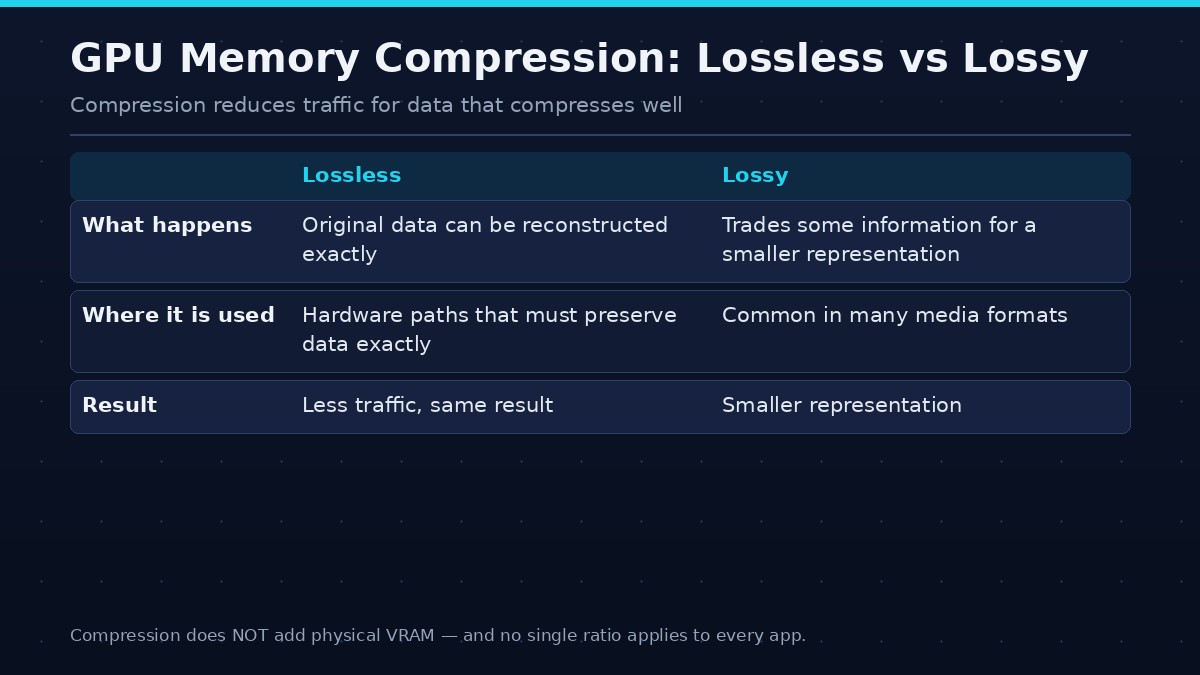
Lossless compression allows the original data to be reconstructed exactly. Lossy compression trades some information for a smaller representation and is common in many media formats. GPU resource compression must follow the correctness requirements of the graphics operation. Different resources and hardware paths can use different techniques, so it is not accurate to assume one universal compression ratio.
How compression interacts with VRAM
Compression can reduce the amount of physical traffic or storage needed for certain data, but the GPU still has a fixed amount of installed memory. Not every resource compresses equally, and metadata or alignment can affect the result. A game can still run out of memory if its working set exceeds the practical budget.
Compression and bandwidth
If a resource compresses well, the GPU may move fewer bytes across the external interface for the same logical workload. This can improve effective bandwidth. The benefit depends on the data pattern, hardware implementation, and application. A workload with poorly compressible data may see a smaller benefit.
Compression and cache
Caches retain frequently used data close to processing units, while compression can reduce the cost of moving supported data through the memory hierarchy. These features can work together, but they solve different problems. Cache reuse reduces repeated fetches; compression can reduce the size of some transfers.
Why results vary
Different games use different rendering techniques, resource formats, and data patterns. A compression mechanism may be valuable in one scene and less useful in another. Synthetic tests may not reflect the same behavior as a real game. Avoid assigning one fixed compression ratio to every application.
What it means for buyers
Memory compression is one part of GPU architecture. Buyers should still compare physical VRAM capacity, memory bandwidth, cache, compute performance, and game benchmarks. Do not treat compression as a reason to ignore a card’s installed memory capacity.
How to evaluate it
Start with the exact product documentation. GPU features can differ between architectures, product tiers, and even variants within a product family. Check the manufacturer’s specification page and technical documentation rather than assuming that a feature name has identical behavior on every generation. When an application exposes a setting related to the feature, review the application’s own documentation as well.
Next, identify the workload. A feature may matter greatly in one game or rendering engine and have little visible effect in another. Compare controlled tests using the same software version, scene, resolution, quality settings, and system configuration. If a benchmark changes several variables at once, it cannot isolate the effect of the feature.
Finally, report the limits of the comparison. State whether the result is a measured application benchmark, a theoretical calculation, or a description based on manufacturer documentation. Avoid assigning a performance percentage to a feature without a reproducible test. The goal is to help readers understand where the feature matters, not to imply that a single specification guarantees a specific frame rate.
Common misunderstandings
A newer architecture does not make every older product obsolete for every workload. A larger number in a specification table does not automatically translate into better application performance. Features may be supported differently by software, and driver updates can change behavior. A benchmark result from one game should not be generalized to all games or creative applications.
Frequently asked questions
Does compression increase VRAM capacity?
No. It can reduce storage or transfer requirements for supported data, but physical capacity remains unchanged.
Is GPU memory compression lossless?
The mechanisms and resource types vary. Some hardware compression paths preserve required data exactly; do not assume one method applies to every resource.
Does compression improve FPS?
It can help when memory traffic is a limiting factor, but the effect depends on workload and GPU architecture.
Can compressed data use less bandwidth?
Yes, when the data compresses effectively and the hardware uses the compressed representation for transfers.
Does every game benefit equally?
No. Data patterns and rendering techniques differ, so the benefit varies by scene and application.
Conclusion
Memory compression helps the GPU move data more efficiently in supported cases. It is an architectural optimization, not a substitute for adequate VRAM.
Use the feature as one part of a broader evaluation. Check exact compatibility, understand the workload, and rely on repeatable tests when comparing products. A technically accurate explanation should show both the benefit and the conditions under which that benefit may not appear.