
What Is Memory Bandwidth in a GPU? Explained With Examples
Introduction
GPU memory bandwidth describes how much data can be transferred between the graphics processor and its external memory over a period of time. It is commonly expressed in gigabytes per second. Bandwidth matters because the GPU repeatedly reads and writes textures, frame buffers, geometry-related resources, and compute data. However, a high bandwidth figure does not guarantee a faster graphics card: cache, compression, compute power, capacity, and software behavior also affect performance.
A GPU specification is most useful when it is connected to a real workload. Gaming, rendering, video production, and AI inference place different demands on memory capacity, bandwidth, cache, and compute resources. This article explains the underlying concepts, describes how they interact, and offers a practical way to interpret specifications without treating one number as a complete performance prediction.
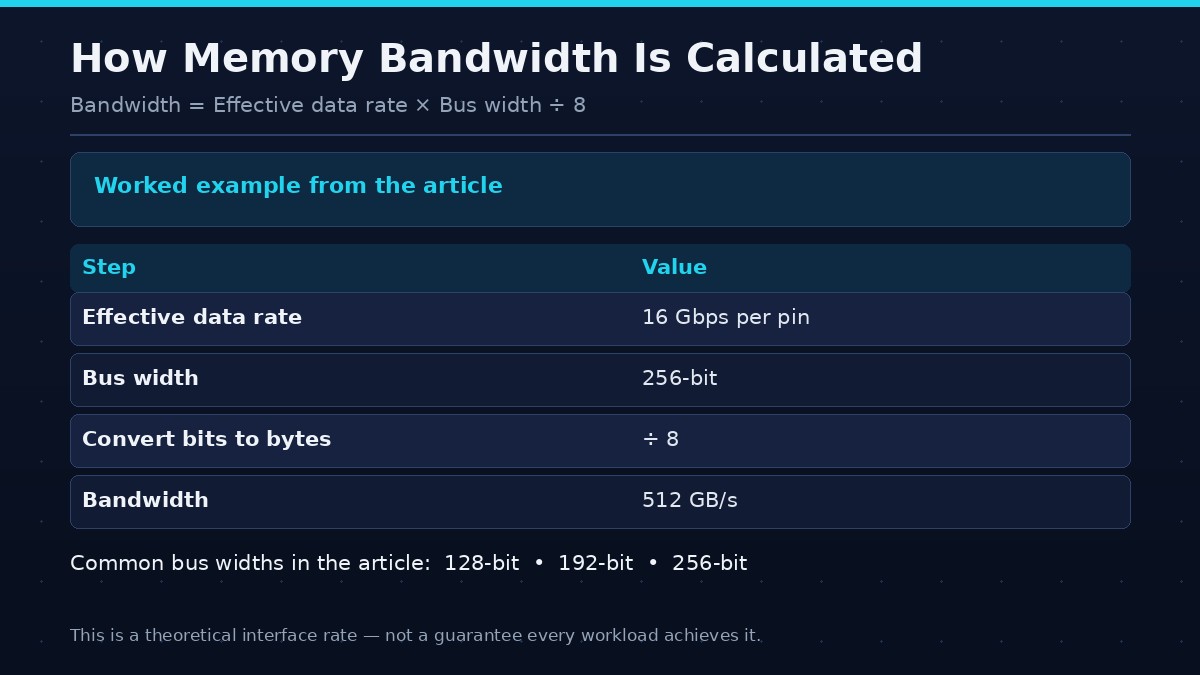
| Step | Value |
|---|---|
| Effective data rate | 16 Gbps per pin |
| Bus width | 256-bit |
| Calculation | 16 x 256 / 8 |
| Result | 512 GB/s |
Quick answer
Bandwidth is the rate of data transfer, usually measured in GB/s. It is influenced by effective memory data rate and bus width, but real application performance also depends on cache, compression, architecture, and workload.
The foundations
A modern graphics processor works with data that must be stored, fetched, transformed, and reused. Some data is accessed repeatedly; other data is needed only for a short rendering or compute stage. Memory controllers, caches, compression, and scheduling help manage these flows. The result is a hierarchy rather than one undifferentiated pool. Local VRAM provides high-throughput storage, caches keep selected data closer to compute units, and system memory can support some workloads through platform-managed pathways.
Capacity and bandwidth should be separated. Capacity determines how much data can remain resident. Bandwidth determines the rate at which data can be transferred. Cache can reduce external-memory traffic when access patterns allow reuse, but it does not replace the need for adequate capacity or bandwidth. The GPU's compute architecture determines how quickly it processes the data after it arrives.
Capacity versus bandwidth
Capacity tells you how much data can be stored in VRAM. Bandwidth tells you how quickly data can move between VRAM and the GPU. A card can have a large memory capacity but modest bandwidth, or high bandwidth with a smaller memory pool. Capacity-related limits and bandwidth-related limits produce different symptoms and require different solutions.
Bus width
The memory bus is the data path connecting the GPU's memory controllers to its memory devices. A wider bus can transfer more bits per transfer cycle, assuming comparable data rates. Common product specifications may list 128-bit, 192-bit, or 256-bit interfaces. Bus width alone does not reveal total bandwidth because memory speed must also be considered.
Data rate
Graphics memory is described using an effective data rate, often in gigabits per second per pin. Higher data rates move more bits over each memory channel in a given period. The exact signaling method and generation influence achievable rates. Use the manufacturer's stated effective rate for the specific GPU rather than guessing from the memory generation.
A simplified bandwidth calculation
Multiply the effective data rate per pin by the total bus width, then divide by eight to convert bits per second into bytes per second. For example, a hypothetical memory interface operating at 16 gigabits per second across a 256-bit bus yields 512 gigabytes per second using this simplified calculation. This is a theoretical interface rate, not a guarantee that every workload achieves it.
How cache changes the picture
GPU caches store selected data closer to processing units. When a workload reuses data that remains in cache, fewer requests need to reach external memory. Cache hit rates and access patterns can therefore make a GPU perform differently from what its external bandwidth figure alone suggests. Cache does not replace VRAM capacity or eliminate all bandwidth constraints.
When bandwidth matters
Bandwidth can be important in high-resolution rendering, memory-heavy effects, large data processing, and workloads with frequent external-memory access. Other workloads may be limited by shader throughput, geometry processing, CPU submission, or capacity. A bottleneck should be identified through application measurements rather than assumed from specifications.
How to compare GPUs
Review stated bandwidth, bus width, memory data rate, cache, capacity, architecture, and real application benchmarks. Compare cards in the same workload and settings. Synthetic memory tests can help characterize transfer performance, but game and creator benchmarks show how the entire system behaves.
How to evaluate the specification in practice
Begin with the exact GPU model and official product specification. Record memory capacity, memory type, bus width, effective data rate, stated bandwidth, cache information where available, and the architecture generation. Then identify the application and workload. A game at 1080p is not the same memory workload as a 4K game, a large 3D scene, or an AI model with a long context window.
Use benchmarks that match the intended task. For gaming, look for the same resolution, settings, game version, and comparable CPU platform. For AI, check model, quantization, framework, batch size, context, and runtime. For rendering or creator workloads, use project sizes and software versions representative of your own work. Synthetic bandwidth tests can describe a narrow aspect of the memory subsystem, but they do not replace application tests.
When comparing two cards, note whether they differ in more than one specification. If one has a different GPU chip, core count, power limit, cache design, or memory capacity, the observed performance gap cannot be attributed to one factor alone. Transparent comparisons identify the complete product and explain what the test can and cannot establish.
Common misconceptions
A larger capacity does not necessarily mean higher frame rates. A wider bus does not always mean a faster GPU. A newer memory generation does not automatically outperform every older implementation. Cache size cannot be compared without considering architecture and access behavior. Manufacturer peak bandwidth is not the same as the effective bandwidth achieved in every application.
Avoid adding dedicated VRAM and shared system memory together as if they were one equally fast pool. Also avoid assuming that a monitoring tool's allocation figure is the minimum memory required by the current workload. These misunderstandings can lead to poor buying decisions and misleading technical content.
Frequently asked questions
Is higher GPU memory bandwidth better?
It can help bandwidth-sensitive workloads, but cache, compute performance, capacity, and software also matter.
How do I calculate bandwidth?
Multiply effective data rate by bus width and divide by eight to convert bits per second into bytes per second.
Does bus width determine GPU speed?
No. It is one part of the memory subsystem and does not measure compute performance or cache efficiency.
Can a GPU with a narrower bus be faster?
Yes. Newer cache designs, higher data rates, stronger compute hardware, and software optimizations can offset a narrower interface in some workloads.
Is bandwidth the same as VRAM size?
No. Capacity is measured in GB; bandwidth is measured in GB/s.
Conclusion
Use bandwidth to understand data-transfer capability, not as a standalone ranking of GPUs. Pair the specification with workload-specific benchmarks.
The best interpretation of a GPU specification combines the hardware design with the workload and independent measurements. Use manufacturer documentation for exact specifications, understand what each metric represents, and compare complete systems under consistent conditions. That approach turns technical numbers into useful buying and engineering decisions.