VRAM Clock Speed vs Memory Bandwidth: Understanding GPU Performance
Introduction
GPU specifications often list memory clock speed, effective data rate, and memory bandwidth. These terms are related, but they are not interchangeable. The physical memory clock describes an underlying operating frequency, while the effective data rate accounts for how many transfers occur over a clock interval. Bandwidth combines data rate with the width of the memory interface. Understanding the distinction helps prevent incorrect comparisons between graphics cards.
Technical specifications become meaningful when readers understand what the component does, how it interacts with the rest of the GPU, and which workloads benefit from it. This guide explains the concept in practical terms, separates related terms that are often confused, and outlines how to evaluate the feature in a real graphics card or workstation. No single specification should be treated as a complete prediction of performance.
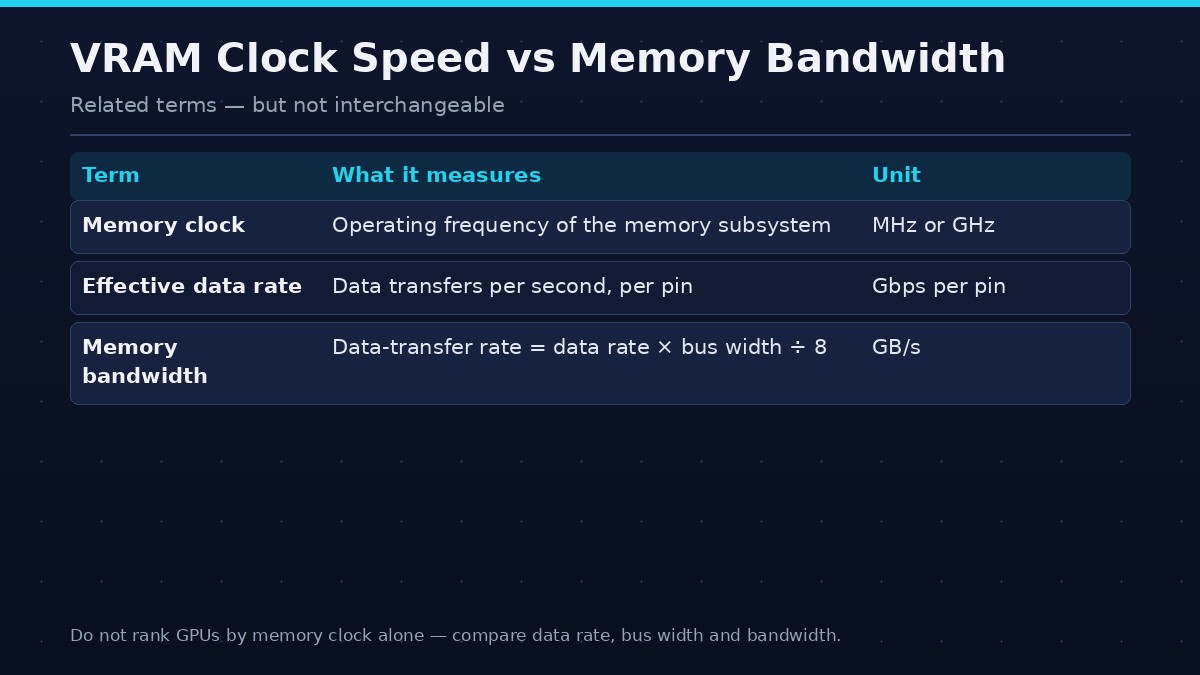
| Term | Meaning | Unit |
|---|---|---|
| Memory clock | The operating frequency of the memory subsystem | MHz or GHz |
| Effective data rate | Transfers per second, accounting for the memory technology | Gbps per pin |
| Bandwidth | Effective data rate multiplied by bus width, divided by eight to convert bits to bytes | GB/s |
Quick answer
Memory clock is an operating frequency, effective data rate describes transfers per second, and bandwidth combines data rate with bus width. Use the manufacturer’s stated bandwidth when comparing cards, and check the exact units and conventions.
Core concepts
A GPU is a collection of specialized processing units connected to a memory hierarchy, command and scheduling systems, caches, and external interfaces. Graphics and compute workloads generate requests for data, perform operations, and write results to memory. The efficiency of this process depends on locality, data format, concurrency, and the design of the hardware and software.
It is useful to distinguish local storage capacity, transfer bandwidth, cache behavior, and compute throughput. Capacity determines how much data can be retained. Bandwidth determines how quickly data can move. Cache can keep frequently accessed information close to processing units. Compute throughput determines how quickly the GPU performs operations. A feature may improve one part of the pipeline without changing the others.
What memory clock speed means
The memory clock is a frequency associated with the graphics memory subsystem. It may be reported in MHz or GHz, depending on the manufacturer and monitoring tool. Different memory technologies transfer data in different ways, so the displayed clock is not necessarily the same as the effective data rate used in bandwidth calculations.
Effective data rate
Modern graphics memory can transfer multiple bits per clock cycle or use signaling schemes that make the effective data rate higher than the underlying clock. Product specifications often express effective data rate in gigabits per second per pin. Compare the stated effective rate rather than assuming that two clock figures from different memory technologies mean the same thing.
How bandwidth is calculated
A simplified theoretical calculation multiplies the effective data rate by the total bus width and divides by eight to convert bits into bytes. The result is expressed in bytes per second, commonly GB/s. Use consistent decimal units and the exact bus width. The manufacturer may state the final bandwidth directly.
Why bus width matters
A memory system with a higher effective data rate can still have lower bandwidth if its bus is narrower. Conversely, a wider bus can provide more bandwidth at a lower data rate. Both values are needed for a meaningful comparison. Cache and compression can also affect the effective external-memory traffic required by a workload.
Overclocking memory
Some graphics cards allow memory overclocking through supported utilities. Higher memory clocks may increase theoretical bandwidth, but stability, temperature, voltage, and error behavior matter. An unstable overclock can cause visual artifacts, crashes, or performance regressions. Make small changes, test thoroughly, and restore default settings if problems occur.
When memory speed affects performance
Bandwidth-sensitive games and compute tasks may benefit from faster memory, while other workloads are limited by shader throughput, CPU performance, or capacity. A memory overclock may produce a small gain or no measurable difference depending on the bottleneck. Benchmark the same scene multiple times and compare frame times as well as average FPS.
How to compare GPU specifications
Check memory technology, effective data rate, bus width, stated bandwidth, capacity, cache, architecture, and application benchmarks. Avoid comparing raw memory clock values across different generations without understanding their transfer conventions. The full memory subsystem determines behavior.
How to evaluate it
Start with the exact product documentation. GPU features can differ between architectures, product tiers, and even variants within a product family. Check the manufacturer’s specification page and technical documentation rather than assuming that a feature name has identical behavior on every generation. When an application exposes a setting related to the feature, review the application’s own documentation as well.
Next, identify the workload. A feature may matter greatly in one game or rendering engine and have little visible effect in another. Compare controlled tests using the same software version, scene, resolution, quality settings, and system configuration. If a benchmark changes several variables at once, it cannot isolate the effect of the feature.
Finally, report the limits of the comparison. State whether the result is a measured application benchmark, a theoretical calculation, or a description based on manufacturer documentation. Avoid assigning a performance percentage to a feature without a reproducible test. The goal is to help readers understand where the feature matters, not to imply that a single specification guarantees a specific frame rate.
Common misunderstandings
A newer architecture does not make every older product obsolete for every workload. A larger number in a specification table does not automatically translate into better application performance. Features may be supported differently by software, and driver updates can change behavior. A benchmark result from one game should not be generalized to all games or creative applications.
Frequently asked questions
Is higher VRAM clock speed always better?
It can increase data rate, but bandwidth also depends on bus width and overall architecture. Stability and workload matter.
Is memory clock the same as bandwidth?
No. Clock is a frequency; bandwidth is a data-transfer rate that depends on effective data rate and bus width.
What is effective memory speed?
It is the effective number of data transfers per second, accounting for the memory technology’s signaling method.
Can memory overclocking increase FPS?
It can help in bandwidth-limited workloads, but gains vary and unstable settings can cause problems.
Should I compare MHz or GB/s?
Use the exact effective data rate and stated bandwidth, while checking bus width and memory generation.
Conclusion
Do not rank GPUs by memory clock alone. Compare effective data rate, bus width, stated bandwidth, and real application performance.
Use the feature as one part of a broader evaluation. Check exact compatibility, understand the workload, and rely on repeatable tests when comparing products. A technically accurate explanation should show both the benefit and the conditions under which that benefit may not appear.