4GB vs 6GB vs 8GB VRAM: How Much Graphics Memory Do Modern Games Need?
Introduction
Choosing a graphics card is not only about the GPU chip, clock speed, or advertised frame rate. The amount of video memory, usually called VRAM, can also influence how smoothly a game runs and which visual settings are practical. A card with 4GB, 6GB, or 8GB of VRAM may render the same scene, but it does not necessarily have enough room to keep the same collection of textures, geometry data, render targets, and other resources resident in memory.
The difference becomes more noticeable as games use larger environments, higher-resolution textures, detailed shadows, complex effects, and higher display resolutions. When the graphics workload exceeds the memory budget available to the game, the system may need to move resources in and out of VRAM. Depending on the game engine, driver, system memory, storage, and GPU, this can contribute to texture pop-in, inconsistent frame times, stuttering, or reduced visual quality.
That does not mean every game needs 8GB, or that a 4GB card is automatically unusable. The right amount depends on the games you play, the resolution you target, the settings you expect to use, and the age and performance level of the GPU itself. This guide explains the practical differences between 4GB, 6GB, and 8GB cards without treating memory capacity as a substitute for overall GPU performance.
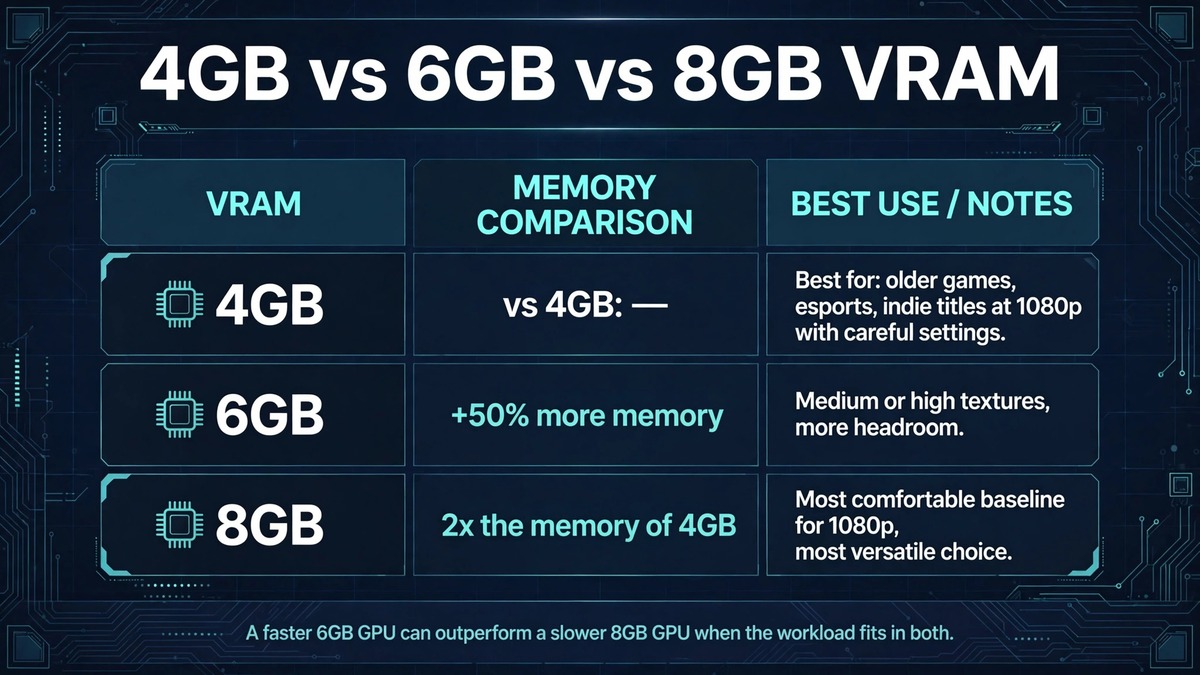
| Capacity | Compared with 4GB | Best for |
|---|---|---|
| 4GB | Baseline | Older games, esports titles, indie games, and less demanding experiences at 1080p |
| 6GB | 50 percent more nominal memory | Medium or high texture settings in games that are uncomfortable on a 4GB card |
| 8GB | Twice as much as 4GB | The most versatile option of the three for a new 1080p-oriented gaming purchase; also useful at 1440p in some games |
Quick answer
For older games, esports titles, indie games, and many less demanding experiences at 1080p, 4GB can still be workable when settings are chosen carefully. Six gigabytes offers more room for modern games and can reduce the need to lower texture quality in some titles. Eight gigabytes is a more comfortable baseline for a wider range of 1080p gaming workloads, although it is not a guarantee that every modern game will run at maximum settings.
The capacity number is only one part of the decision. A faster GPU with 6GB may outperform a slower GPU with 8GB when the workload fits in both memory pools. Conversely, when a game genuinely needs more than the smaller card can comfortably hold, the extra capacity can help preserve texture quality and frame-time consistency. Compare complete graphics cards and real workloads, not VRAM figures in isolation.
What VRAM actually stores
VRAM is high-speed memory attached to or integrated with a graphics processor. During a game, it holds data the GPU needs to access quickly. Common examples include texture maps, shadow maps, geometry-related resources, frame buffers, render targets, lighting data, and intermediate resources used by post-processing effects.
A texture is an image applied to a surface. A small texture may be sufficient for a distant object, while a detailed texture is useful when the player approaches a wall, character, or weapon. Games often keep multiple texture levels available so that they can select an appropriate level of detail based on distance and screen coverage. Higher-resolution texture assets generally require more storage space, though compression formats and engine streaming systems influence the final memory footprint.
VRAM use is dynamic. A game’s memory allocation can rise and fall as the player moves through an environment, changes settings, opens menus, or loads a new level. The amount reported by an overlay is not always the same as the amount actively required at that instant. Some engines reserve memory in advance to avoid repeated allocation, while others stream resources more aggressively. Therefore, a high allocation reading does not by itself prove that a card is running out of usable memory.
What changes between 4GB, 6GB, and 8GB?
The simple difference is capacity: 6GB provides 50 percent more nominal memory than 4GB, while 8GB provides twice as much as 4GB. That extra space can allow a game to keep more resources resident, but it does not directly double performance. Frame rate still depends on shader throughput, memory bandwidth, CPU performance, game optimization, resolution, and many other factors.
A 4GB graphics card
Four gigabytes is a constrained capacity for demanding modern games, especially when high-resolution textures or advanced effects are enabled. It can still be suitable for older titles, competitive games with modest graphics requirements, lighter games, and lower settings. At 1080p, reducing texture quality can sometimes be a more useful adjustment than lowering every graphics option indiscriminately.
The limitation is not that every frame requires a fixed amount of memory. Rather, a game may need a collection of assets that exceeds the practical budget available to it. When that happens, the engine may stream assets more frequently, lower texture detail, or rely on system memory and storage pathways. The resulting experience varies significantly between games.
A 6GB graphics card
Six gigabytes creates additional headroom. It can make it easier to use medium or high texture settings in games that are uncomfortable on a 4GB card. It may also help when several large assets are visible at once or when the game has a relatively high baseline memory footprint.
However, 6GB is not a universal solution. Some games can exceed that budget at high settings, particularly when texture packs, ray tracing, high resolutions, or optional high-detail assets are involved. The GPU’s processing power also matters: if the chip is too slow for the desired settings, the additional memory will not make it fast enough.
An 8GB graphics card
Eight gigabytes offers the most flexibility among these three capacities. For many 1080p workloads, it provides a more comfortable buffer for texture assets and modern rendering features. It can also be useful at 1440p in games with moderate memory demands, provided the GPU itself has enough performance for that resolution.
Still, 8GB should not be described as unlimited or future-proof. Certain modern games, high-resolution texture packs, ray-tracing workloads, and creator applications can use more. A game that reports 7GB allocated may not need all of it at once, while another game can show a lower allocation and still experience memory pressure due to its streaming behavior.
Resolution and texture quality
Resolution and texture quality are related to memory use, but they affect it in different ways. A higher resolution increases the number of pixels the GPU must render. This increases the size of some render targets and can raise memory bandwidth and processing requirements. Texture quality controls the detail level of surface assets and can have a more direct effect on the space needed for texture resources.
Moving from 1080p to 1440p increases the pixel count substantially. Moving from 1440p to 4K increases it again. This does not mean VRAM consumption scales in a perfectly linear fashion with pixel count, because engines reuse assets, compress data, and manage resources differently. It does mean that higher resolutions can add pressure to both memory capacity and GPU performance.
Texture settings deserve particular attention. In many games, lowering textures can reduce VRAM pressure while preserving much of the game’s lighting, geometry, and overall image composition. By contrast, lowering resolution may reduce GPU workload but can make the image visibly softer. The best setting adjustment depends on whether the bottleneck is memory capacity, shader performance, bandwidth, or another component.
Why average FPS is not the whole story
A benchmark that reports only average frames per second can hide short interruptions. Average FPS describes the overall rate across a test, but it does not fully describe how evenly frames are delivered. A game can average a seemingly acceptable frame rate while still producing occasional long frames that the player experiences as a hitch.
Frame-time graphs and percentile measurements provide additional context. The 1% low is commonly used as a summary of slower frames, although different testing tools calculate it in different ways. It should be reported with the test method rather than treated as a perfectly standardized number. If a smaller-memory card repeatedly shows worse frame pacing in the same scene, memory pressure may be one possible cause, but CPU limits, shader compilation, asset streaming, and driver behavior should also be investigated.
A good VRAM comparison should therefore report average FPS, low-percentile performance, frame-time behavior, visual quality, and any observed texture streaming problems. It should also repeat tests so that a one-off hitch does not become the headline result.
How to test the three capacities fairly
A useful comparison needs to control as many variables as possible. Ideally, use graphics cards with similar GPU architecture and processing capability but different memory capacities. In real product lineups, memory capacity often differs alongside core count, memory bus width, or clock speed. If the cards are not otherwise comparable, the test must clearly state those differences.
Use the same system, game version, driver branch, CPU, RAM configuration, storage device, and graphics settings. Record the exact resolution and whether upscaling, frame generation, ray tracing, or dynamic resolution is enabled. Test a repeatable route or built-in benchmark, and allow shaders and assets to finish compiling before recording results.
Measure more than the memory number displayed in an overlay. Record average FPS, 1% low or another clearly defined percentile, frame-time traces, GPU utilization, system RAM use, and any visible texture or streaming issues. Run multiple passes and report the range or average of the results. If a test produces a stutter, note whether it happens at the same location and whether it can be reproduced.
Do not claim that a card is memory-limited solely because the overlay shows nearly all VRAM in use. Stronger evidence includes repeatable performance degradation when texture settings are raised, visible asset streaming problems, and improvement after reducing memory-heavy settings while keeping the GPU workload otherwise similar.
Settings to adjust when memory is limited
Start with texture quality because it is often one of the most direct controls for asset memory. If a game offers separate texture pool, texture streaming, or high-resolution asset options, test those individually. Next, review ray tracing and high-resolution shadow settings, which can add substantial resource requirements depending on the engine.
Close unnecessary applications that use the GPU, including browser tabs with hardware acceleration, recording software, overlays, and creative applications. This will not transform a 4GB card into an 8GB card, but it can reduce competing allocations. Keep graphics drivers and games updated, while remembering that a driver update is not guaranteed to improve every title.
Avoid registry tweaks or unofficial tools that claim to create extra dedicated VRAM on a discrete graphics card. Software cannot turn system RAM into equally fast physical graphics memory. Shared GPU memory is a fallback mechanism managed by the operating system and driver; it is not equivalent to dedicated VRAM.
Buying guidance
Choose based on the complete card and the games you actually play. A 4GB card may be a sensible low-cost option for an older PC, basic display use, lightweight games, or a system where expectations are modest. It is a less flexible choice for a new gaming build focused on demanding releases.
Six gigabytes can be a practical middle ground in a used or budget system, especially if the GPU offers strong performance for the price. Check independent tests for the specific model rather than assuming the extra memory guarantees a better result.
Eight gigabytes is generally the most versatile option of these three for a new 1080p-oriented gaming purchase. But compare it against newer cards with more efficient architectures, better encoding support, stronger ray-tracing hardware, and longer driver support. A larger memory number does not automatically make an older card the better purchase.
Frequently asked questions
Is 4GB VRAM enough for 1080p gaming?
It can be enough for older games, esports titles, and less demanding games with sensible settings. In demanding modern titles, 4GB may require lower texture quality and other compromises. The exact result depends on the game, GPU speed, and target frame rate.
Is 6GB much better than 4GB?
It offers 50 percent more nominal capacity, which can provide useful headroom. The practical improvement depends on whether the game was constrained by memory in the first place. If the GPU core is already the limiting factor, extra capacity may have little effect on FPS.
Is 8GB enough for 1440p?
It can be sufficient for some 1440p games and settings, but it is not a guarantee for every modern release or high-resolution texture pack. The GPU’s processing performance and the game’s memory behavior matter just as much.
Does more VRAM always increase FPS?
No. More VRAM helps when the workload needs additional capacity. It does not automatically increase shader performance, memory bandwidth, or clock speed. If the game fits comfortably in the existing memory pool, a larger capacity may produce little or no frame-rate difference.
Can system RAM replace VRAM?
System RAM can be used for some GPU resources through shared-memory mechanisms, but it is not a direct replacement for dedicated graphics memory. Transfers across the system memory path can have different latency and bandwidth characteristics and may reduce performance.
Should I buy a slower 8GB card instead of a faster 6GB card?
There is no universal answer. Compare independent benchmarks in the games and applications you use. If the 6GB card is substantially faster and its memory is sufficient for your settings, it may be better. If the 6GB model repeatedly encounters memory limits, the 8GB model may offer a smoother experience.
Conclusion
The choice between 4GB, 6GB, and 8GB VRAM is really a choice about workload flexibility. Four gigabytes can still serve modest gaming needs, six gigabytes provides additional breathing room, and eight gigabytes is the most comfortable option among the three for a broader range of 1080p gaming. None of these capacities should be evaluated in isolation.
Look at the GPU model, memory bandwidth, architecture, game requirements, resolution, texture settings, and independent performance tests. When reviewing benchmarks, pay attention to frame times and visual behavior as well as average FPS. That approach gives a more realistic picture of what a graphics card can deliver than comparing the VRAM number on a product page.