The 128-bit vs 256-bit Bus Width Problem: Why Bandwidth Matters
When PC gamers shop for a new graphics card, the first two specifications they typically look at are the GPU core model (like RTX 4070 or RX 7800 XT) and the total Video RAM capacity (like 12GB or 16GB). For the vast majority of consumers, the purchasing decision stops right there. However, hidden slightly further down the specification sheet is an incredibly vital metric that completely dictates how well a graphics card will perform at high resolutions: The Memory Bus Width.
In recent hardware generations, both NVIDIA and AMD have made highly controversial architectural decisions regarding memory buses, particularly in their budget and mid-range tiers. We have seen graphics cards released with a healthy 16GB of VRAM capacity, only to perform terribly at 1440p and 4K resolutions because they are shackled to a severely restricted 128-bit memory bus.
To understand why a graphics card with plenty of memory capacity can still stutter and choke, we have to explore the mechanics of memory bandwidth, explain the physical difference between a 128-bit and a 256-bit interface, and reveal exactly how bus width dictates your gaming resolution.
| Resolution | Pixels per frame | 128-bit bus verdict |
|---|---|---|
| 1080p (1920×1080) | 2.07 million | Perfectly adequate at around 288 GB/s |
| 1440p (2560×1440) | 3.68 million (77% more than 1080p) | Struggles — a severe traffic jam |
| 4K (3840×2160) | 8.29 million | Essentially impossible for modern AAA titles; a 256-bit bus (roughly 500 GB/s to 600 GB/s) is the minimum |
What is a Memory Bus? The Highway Analogy
The easiest way to conceptualize how VRAM interacts with your GPU processor is to visualize a highway system.
- VRAM Capacity (e.g., 16GB): This is the size of the warehouse. It dictates how much cargo (textures, geometry, ray tracing structures) you can store locally at any given time.
- Memory Bus Width (e.g., 128-bit or 256-bit): This is the number of lanes on the physical highway connecting the warehouse to the factory (the GPU core).
- Memory Speed (e.g., 18 Gbps): This is the speed limit on that highway.
- Total Memory Bandwidth (e.g., 288 GB/s): This is the final metric. It represents the maximum amount of total cargo that can arrive at the factory every single second. Bandwidth is calculated by combining the number of lanes (bus width) and the speed limit (memory speed).
The fundamental problem facing modern PC hardware is that memory capacity and memory bandwidth must remain balanced. If you build a massive 16GB warehouse, but you only connect it to the factory with a narrow, two-lane country road (a 128-bit bus), the factory will constantly sit idle waiting for delivery trucks to arrive. The warehouse has plenty of cargo, but the road physically cannot move it fast enough to keep the processing cores busy.
The Math: Calculating Total Memory Bandwidth
To truly compare the capabilities of different graphics cards, you should always look at the Total Memory Bandwidth, measured in Gigabytes per second (GB/s). The formula to calculate this is straightforward:
(Memory Clock Speed x Bus Width) / 8 = Total Bandwidth (GB/s)
Let’s compare two hypothetical, but highly realistic, graphics card configurations from recent generations to see how crippling a narrow bus can be:
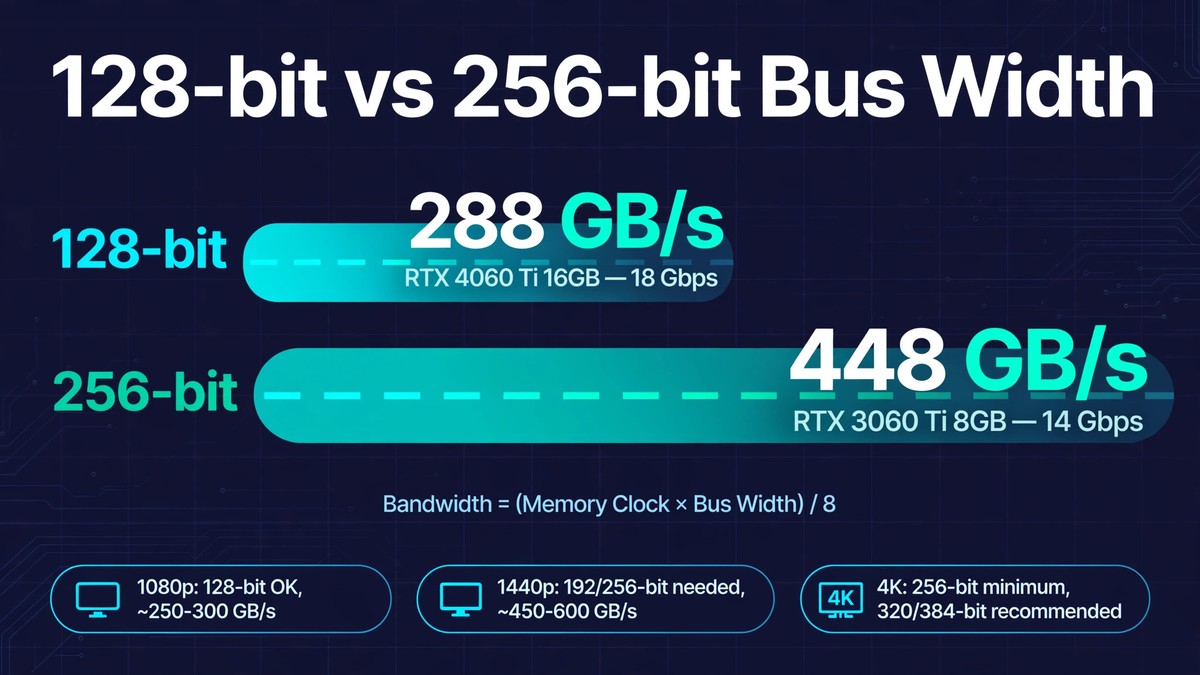
Card A: The 128-bit Mid-Range Card (e.g., RTX 4060 Ti 16GB)
- Memory Speed: 18 Gbps (GDDR6)
- Bus Width: 128-bit
- Calculation: (18 x 128) / 8 = 288 GB/s Total Bandwidth
Card B: The 256-bit Previous Gen Card (e.g., RTX 3060 Ti 8GB)
- Memory Speed: 14 Gbps (Older GDDR6)
- Bus Width: 256-bit
- Calculation: (14 x 256) / 8 = 448 GB/s Total Bandwidth
Notice the incredible disparity. Even though Card A uses significantly faster, newer memory modules (18 Gbps vs 14 Gbps) and has double the VRAM capacity, Card B completely destroys it in raw memory throughput simply because its physical highway is twice as wide. Card B can deliver 448 Gigabytes of graphical data to its processor every single second, while Card A is hard-capped at 288 Gigabytes.
How Resolution Interacts with Bandwidth
Why does this matter for gaming? Because memory bandwidth requirements do not scale linearly; they scale exponentially as you increase your rendering resolution.
The 1080p Scenario (Where 128-bit Survives)
When you are gaming at a standard 1080p resolution (1920×1080), your GPU is pushing roughly 2.07 million pixels per frame. The mathematical workload is relatively light, and the frame buffers are small. At 1080p, a 128-bit bus with ~288 GB/s of bandwidth is perfectly adequate. The GPU cores will receive all the texture data and geometry they need exactly when they need it, resulting in high frame rates and a smooth experience.
The 1440p Scenario (Where 128-bit Struggles)
Moving from a 1080p monitor to a 1440p monitor (2560×1440) increases the pixel count to 3.68 million pixels per frame—a massive 77% increase in spatial resolution. Suddenly, the GPU needs to read and write significantly larger high-resolution textures, larger shadow maps, and vastly larger Z-buffers (depth information).
This is where the 128-bit highway becomes a severe traffic jam. The GPU core is powerful enough to calculate the 1440p frame, but it physically cannot fetch the massive 1440p texture files from the VRAM fast enough through the narrow 128-bit interface. The cores sit idle, frame times spike, and performance falls off a cliff. This is why a card like the RTX 4060 Ti looks highly competitive against older cards at 1080p, but falls significantly behind them the moment you switch to a 1440p display.
The 4K Scenario (Where 256-bit is Mandatory)
At full 4K resolution (3840×2160), the GPU is pushing 8.29 million pixels per frame. The bandwidth requirements for pushing uncompressed 4K textures and managing 4K render targets are astronomical. Attempting to game natively at 4K on a 128-bit memory bus is essentially impossible for modern AAA titles. The bandwidth starvation will completely choke the GPU.
For a reliable 4K gaming experience, a 256-bit memory bus (providing roughly 500 GB/s to 600 GB/s) is the absolute minimum requirement, with high-end enthusiast cards utilizing massive 320-bit or 384-bit buses (like the RTX 4090) to push bandwidths exceeding 1,000 GB/s (1 Terabyte per second).
The Cache Band-Aid: L2 Cache Increases
If narrow 128-bit buses are so terrible for high-resolution gaming, why are NVIDIA and AMD utilizing them on cards that cost over $400?
The answer is silicon manufacturing costs. Creating a 256-bit memory interface requires the GPU chip itself to be physically larger to accommodate the extra wiring and memory controllers. It also requires a more complex and expensive printed circuit board (PCB) to wire eight distinct memory chips around the processor instead of just four.
To offset the performance penalty of a 128-bit bus, both manufacturers have radically increased the size of the L2 Cache located directly on the GPU die. (AMD calls their version Infinity Cache). For example, older NVIDIA cards typically had 4MB of L2 Cache. Modern Ada Lovelace cards have up to 48MB of L2 Cache.
This massive on-die cache acts as an ultra-fast temporary storage bin. If the GPU can find the data it needs inside the 48MB L2 Cache, it doesn’t have to use the slow 128-bit highway to check the VRAM. This strategy works brilliantly at 1080p, allowing manufacturers to cut manufacturing costs while maintaining high performance.
However, the L2 Cache strategy falls apart at higher resolutions. A 48MB cache simply isn’t large enough to hold all the mathematical data required for a dense 1440p or 4K frame, especially when Ray Tracing is enabled. The GPU is forced to look past the cache and use the main VRAM highway, immediately hitting the 128-bit bottleneck.
Final Verdict: Matching Bus Width to Your Monitor
When evaluating a new graphics card purchase, you cannot evaluate VRAM capacity in a vacuum. A 16GB graphics card on a 128-bit bus is a highly specialized piece of hardware. It is excellent for generative AI workloads or heavy 1080p gaming, but the massive 16GB warehouse is effectively useless for traditional 1440p or 4K gaming because the narrow highway cannot move the required data.
- For 1080p Gaming: A 128-bit memory bus (yielding ~250 GB/s to ~300 GB/s) is perfectly acceptable and highly efficient.
- For 1440p Gaming: You must prioritize a 192-bit or 256-bit memory bus (yielding ~450 GB/s to ~600 GB/s) to ensure stable frame pacing and longevity as game engines become heavier.
- For 4K Gaming: A 256-bit bus is the bare minimum, with 320-bit or 384-bit memory interfaces highly recommended for premium, high-refresh-rate experiences.