
Q4 vs Q5 vs Q8 Quantization: Understanding AI Memory Requirements
Introduction
Quantization reduces the numerical precision used to store model weights, making large language models easier to run on hardware with limited memory. Labels such as Q4, Q5, and Q8 are shorthand for quantization families or approximate bit-width choices, not universal guarantees of exact file size or quality. The practical trade-off involves memory footprint, output quality, inference speed, supported kernels, and the particular model architecture.
This guide is designed to answer the practical question behind the headline, explain the technical principles involved, and give readers a repeatable way to evaluate their own hardware. Graphics memory is often discussed as if it were a single performance number, but real workloads are more complicated. The amount of memory installed, the amount currently allocated, the amount actively needed, the speed of the memory subsystem, and the work performed by the GPU core are related but distinct factors.
A useful analysis starts by identifying the workload. A game, an AI model, a 3D scene, and a video-editing timeline can use the same graphics card in very different ways. Each application creates its own resource footprint and responds differently when memory becomes constrained. The same capacity can be comfortable in one task and limiting in another. For that reason, this article avoids universal claims and explains which variables should be checked before making a decision.
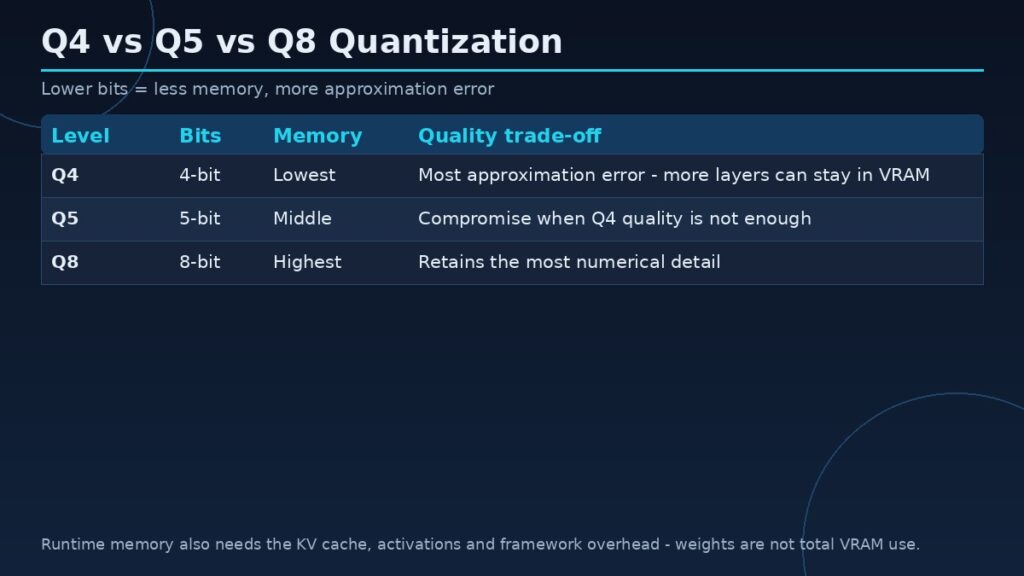
| Quantization | Precision | Trade-off |
|---|---|---|
| Q4 | 4-bit | Substantially reduces model-weight storage compared with 16-bit; uses an approximation that can affect output quality |
| Q5 | 5-bit | A compromise when Q4 quality is not satisfactory and Q8 requires too much memory |
| Q8 | 8-bit | Retains more numerical detail than Q4 or Q5; usually requires more weight storage |
Quick answer
Treat Q4, Q5, and Q8 as trade-off options. Choose the lowest memory footprint that preserves acceptable quality and performs well in your actual inference software.
The central rule is to measure the workload you actually run, not to assume that a specification or monitoring number tells the whole story. Where possible, compare equivalent settings, record repeatable measurements, and separate capacity limits from compute, bandwidth, CPU, storage, and software limitations.
What quantization changes
A neural network contains learned numerical weights. Full-precision formats store those values with more bits, while quantized formats represent them using fewer bits and scaling information. Lower precision can reduce storage requirements and memory traffic. Quantization methods differ in how they group values, calculate scales, handle outliers, and preserve important information. Consequently, two files labeled Q4 may not have identical quality or runtime behavior.
Understanding Q4
Four-bit quantization can substantially reduce model-weight storage compared with common 16-bit representations. This can make a model accessible on a smaller GPU or allow more layers to remain in VRAM. The trade-off is that representing weights with fewer bits introduces approximation error. Modern methods are designed to manage that error, but output quality can still vary by model, task, and quantization implementation.
Understanding Q5
Five-bit formats sit between common four-bit and eight-bit choices in terms of nominal representation precision. They can offer a compromise when Q4 quality is not satisfactory and Q8 requires too much memory. The actual difference depends on the quantization scheme, block structure, metadata overhead, and inference engine. It is important to compare the exact file format and implementation rather than relying on the letter and number alone.
Understanding Q8
Eight-bit quantization generally retains more numerical detail than lower-bit alternatives, though it still differs from higher-precision formats. It usually requires more weight storage than Q4 or Q5. For some models and workloads, the quality difference may be small; for others, it may matter more. The best choice should be evaluated with representative prompts and task-specific tests.
Why model weights are not total VRAM use
Runtime memory also includes the KV cache, temporary activations, compute buffers, context data, and framework overhead. A model file that appears to fit into the GPU’s memory may leave too little space for a long context or larger batch. The KV cache can become a major part of memory use as context length and concurrent sequences increase. Always leave headroom rather than planning to use every byte for weights.
Speed is not determined by bit width alone
Lower-bit weights can reduce memory bandwidth demand, but performance depends on whether the GPU and inference engine have efficient kernels for that format. Dequantization overhead, tensor-core support, memory bandwidth, batch size, and CPU offloading can change throughput. A Q4 model may be faster on one system and slower on another if the software path is different.
How to compare quantizations
Use the same base model, tokenizer, inference engine, prompt set, context length, sampling parameters, and hardware. Compare file size, peak VRAM, tokens per second, time to first token, and output quality. Use a diverse evaluation set rather than one prompt. Record the exact quantization format and software version because labels can hide meaningful implementation differences.
A practical evaluation workflow
Start by documenting the exact hardware and software configuration. Record the GPU model, installed memory capacity, driver version, operating system, application version, CPU, system memory, and storage device. In a laptop or compact system, also note power mode and thermal conditions because those can change sustained performance. For a game, write down resolution, texture quality, ray tracing, upscaling, frame generation, and the exact scene or benchmark route. For an AI workflow, record model name, quantization, context length, batch size, framework, and whether layers are offloaded to CPU.
Next, establish a baseline. Close unnecessary applications, allow the workload to reach a steady state, and repeat the same task several times. Record average performance as well as low-percentile behavior or completion time. Capture memory allocation and system RAM use, but do not interpret either number alone. If the application exposes logs, save them. A screenshot is useful for documenting settings, while a CSV or frame-time trace is better for later comparison.
Change one variable at a time. If you change resolution, texture quality, batch size, model quantization, and driver version together, it becomes impossible to know which change produced the result. A controlled test can reveal whether a setting affects memory capacity, compute load, bandwidth, or simply image quality. Repeat the test after each change and note any visual or functional differences.
Finally, report the limitations. State whether the result came from a built-in benchmark, a repeatable manual route, a synthetic test, or a single real project. Explain whether the test was repeated and whether the measurement tool reports allocated, reserved, or actively used memory. Honest methodology makes an article more useful than a confident headline supported by an unexplained number.
Common mistakes and misleading conclusions
One common mistake is treating memory allocation as proof of memory exhaustion. Applications may reserve unused capacity for caching, and monitoring utilities do not all report the same metric. Another mistake is assuming that more capacity automatically increases performance. Extra memory helps when the workload needs it; it does not make shader cores faster or increase the speed of a narrow memory bus.
A third mistake is comparing different graphics cards as though memory capacity were the only difference. GPU architecture, core count, memory bandwidth, power limits, cooling, and driver maturity can all affect results. If two products differ in several ways, describe the comparison as a product-level test rather than a controlled memory-capacity experiment.
It is also easy to overlook software versions. Game patches can change asset streaming, shader compilation, and graphics settings. AI frameworks can change memory allocation strategies between releases. A result should therefore include a date and version information, and older findings should be retested before being presented as current advice.
Frequently asked questions
Does Q4 mean exactly four bits per parameter?
Not necessarily. Quantization formats may include scales, metadata, mixed-precision tensors, and block structures that change average storage per parameter.
Is Q8 always better quality than Q4?
It often preserves more numerical detail, but the actual quality difference depends on the model, quantization method, and task.
Does Q4 use less VRAM?
Generally, Q4 weight files use less memory than comparable Q5 or Q8 files, but runtime overhead and KV cache also matter.
Can Q4 make a model faster?
It can reduce memory traffic, but kernel support and hardware determine whether that translates into faster inference.
Which quantization should beginners choose?
Start with a well-tested quantization recommended by the model or inference-tool community, then compare quality and memory use on your own tasks.
Conclusion
Treat Q4, Q5, and Q8 as trade-off options. Choose the lowest memory footprint that preserves acceptable quality and performs well in your actual inference software.
The most reliable decision comes from matching the hardware to a clearly defined workload and validating it with repeatable evidence. Use specifications to narrow the options, use measurements to understand actual behavior, and explain the limits of every comparison. That approach helps readers make a better decision without confusing a single memory figure with total graphics performance.