
GPU VRAM Requirements for 7B, 13B, 34B and 70B AI Models
Introduction
The parameter count of a language model is a useful starting point for estimating memory, but it is not the whole requirement. A 7B model and a 70B model differ greatly in weight storage, yet runtime memory also depends on quantization, context length, batch size, cache format, framework overhead, and how much of the model is placed on the GPU. A card that can load a model’s weights may still lack enough room for a practical context window or concurrent requests.
Graphics memory is a finite working space, but the way an application uses it is shaped by its engine, data structures, runtime settings, and hardware. A useful guide must therefore explain both the general principle and the conditions that can change the outcome. The same GPU can behave differently after a software update, with a different model or game scene, or when another application is using the graphics processor.
This article focuses on practical understanding rather than a universal rule. It explains the terminology, identifies the variables worth checking, and provides a repeatable approach for evaluating a real system. Where a result depends on a specific application, that dependency should be made explicit instead of turning one observation into a claim about every workload.
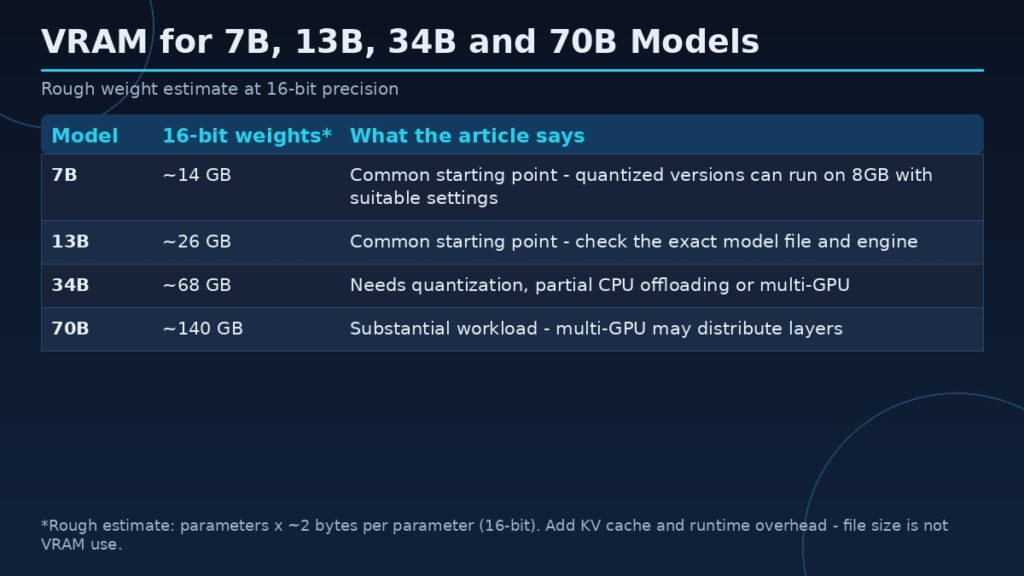
| Model size | Rough 16-bit weight estimate | Article’s guidance |
|---|---|---|
| 7B | About 14 GB | Common starting point for local experimentation; some quantized 7B models can run on 8GB VRAM with suitable settings |
| 13B | About 26 GB | Common starting point for local experimentation |
| 34B | About 68 GB | Much larger weight budget; quantization, offloading, or multiple GPUs may help |
| 70B | About 140 GB | Substantial local workload; quantization, offloading, or multiple GPUs may help |
Quick answer
Model size gives a first estimate, not a complete system requirement.
Key concepts
Before changing hardware or settings, distinguish capacity from allocation and performance. Capacity is the physical amount of local graphics memory installed on the card. Allocation is the amount an application or driver has reserved or committed at a particular time. Active working-set demand is the data that must be available for the current workload to proceed efficiently. Monitoring tools can expose useful clues, but they may report different metrics and should not be treated as interchangeable.
Also distinguish memory capacity from bandwidth and compute throughput. Capacity determines how much data can reside locally. Bandwidth describes the rate at which data can move between memory and the GPU. Compute throughput describes how quickly the GPU can execute operations. A workload may be limited by any one of these factors, or by the CPU, storage, cooling, power limit, or software implementation.
A simple weight-storage estimate
A rough estimate multiplies the number of parameters by the bytes used per parameter. A 16-bit representation requires roughly two bytes per parameter before additional overhead, while lower-bit quantization reduces that amount. This arithmetic is useful for understanding scale, but real quantized files include scales, metadata, and sometimes tensors stored at higher precision. The runtime also needs memory beyond the weights.
7B and 13B models
Models in the 7B and 13B classes are common starting points for local experimentation. Depending on quantization and runtime, they may fit on a range of consumer GPUs, but context length and software overhead can change the practical requirement. A 7B model at a compact quantization is not equivalent to a 13B model at higher precision. Check the specific model file and inference engine rather than assuming every model with the same parameter count has identical memory use.
34B models
A 34B model requires a much larger weight budget than a 7B or 13B model. Quantization, partial CPU offloading, and multi-GPU distribution may make it possible to run on systems that cannot hold the entire model in one GPU. These approaches introduce trade-offs in speed, system RAM requirements, interconnect traffic, and configuration complexity. A model that technically loads may still generate tokens too slowly for the intended use.
70B models
A 70B model is a substantial local workload. Even heavily quantized versions can require considerable memory, and the KV cache can add significant runtime demand. Multi-GPU systems may distribute layers or tensors, but the result depends on framework support, GPU interconnect, and memory balancing. Do not assume two cards combine into one seamless pool in every application.
Context length and KV cache
The KV cache stores intermediate attention information for tokens already processed. Its size depends on model architecture, number of layers, attention heads, cache precision, context length, and batch or sequence count. Increasing context can raise memory use even when the model weights remain unchanged. This is why a configuration that works for a short prompt may fail on a long document.
Offloading and multi-GPU choices
CPU offloading can place some layers or data in system RAM, reducing local VRAM demand but adding transfer overhead. Multi-GPU execution can distribute work, but not every runtime supports every strategy. PCIe bandwidth, GPU topology, and synchronization can affect performance. Evaluate the complete system rather than adding nominal capacities and assuming they behave like one card.
Planning a model deployment
Record model revision, quantization format, context target, batch size, concurrency, runtime, and GPU placement. Measure peak memory during both model loading and generation. Test the longest prompt and largest expected batch. Leave room for operating-system and application overhead, and validate throughput as well as whether the model starts successfully.
A step-by-step way to investigate
First, write down the exact system configuration. Include the graphics card, memory capacity, driver, operating system, CPU, system RAM, storage, and application version. Record the workload and its settings. In a game, include resolution, texture quality, ray tracing, upscaling, and the scene being tested. In an AI or workstation task, include the model or project, precision, batch size, context length, plugins, and offloading options.
Second, create a baseline using a repeatable task. Close unnecessary background applications, allow the workload to settle, and repeat the same action several times. Capture performance, memory allocation, system RAM use, GPU utilization, and any visible errors or quality changes. Do not rely on one short run. A background update or first-time shader compilation can distort a measurement.
Third, change one setting at a time. This is essential. If several options are changed simultaneously, the cause of an improvement or regression cannot be identified. Save the original settings, test the new configuration, and restore the baseline before testing another variable. When possible, use logs or frame-time captures instead of relying only on a screenshot.
Finally, report what the test does and does not prove. A single application version and one system configuration cannot establish a universal hardware requirement. Explain the test environment, disclose limitations, and distinguish measured results from estimates. This is especially important when publishing advice that readers may use to spend money or change a production workflow.
Common pitfalls
A common pitfall is assuming that a high allocation reading proves the card is out of memory. Software may reserve resources for caching, and different tools may expose dedicated usage, shared usage, committed memory, or budget information. Another pitfall is assuming that more VRAM automatically makes a GPU faster. Additional capacity can prevent a capacity-related problem, but it does not increase the number of shader cores or guarantee higher bandwidth.
A third pitfall is ignoring software changes. Drivers, game patches, AI frameworks, model formats, and operating-system updates can change memory behavior. Record versions and dates, and retest important claims after substantial updates. Avoid undocumented registry edits or utilities that promise to manufacture additional dedicated VRAM; software cannot change the physical memory installed on a discrete graphics card.
Frequently asked questions
Can a 7B model run on 8GB VRAM?
Some quantized 7B models can run with suitable settings, but context length, runtime overhead, and other GPU applications affect whether it fits comfortably.
How much VRAM does a 70B model need?
There is no single number. Quantization, architecture, context, cache precision, and offloading strategy substantially change the requirement.
Does a longer context use more VRAM?
Usually yes, because the KV cache or related attention state grows with context, although exact behavior depends on architecture and runtime.
Can two GPUs combine their VRAM?
Some frameworks can distribute model components across GPUs, but memory is not automatically pooled for every application.
Is model file size equal to VRAM use?
No. Runtime buffers, KV cache, metadata, and framework overhead add to weight storage.
Conclusion
Estimate weights first, then add runtime cache and overhead. Test the exact model, quantization, context, and inference engine before choosing hardware.
The most dependable approach is to define the workload, measure it under controlled conditions, and interpret memory readings alongside performance and system behavior. Use manufacturer documentation for specifications, application documentation for supported settings, and repeatable tests for performance claims. That produces advice that is both more accurate and more useful than a one-number rule.