
Unreal Engine 5 VRAM Allocation: The Hidden Cost of Nanite and Lumen
Unreal Engine 5 (UE5) by Epic Games has fundamentally shifted the paradigm of real-time computer graphics, bringing cinematic, ray-traced lighting and practically infinite geometry scaling to the PC gaming ecosystem. The engine promises a generational leap in visual fidelity, allowing independent developers and massive AAA studios alike to create worlds with unprecedented detail. However, this revolutionary graphical leap does not come for free. Games built on the UE5 framework—such as Remnant 2, Lords of the Fallen, Immortals of Aveum, and Ark: Survival Ascended—have become utterly infamous within the PC building community for their voracious, often uncompromising appetite for Video RAM (VRAM).
For PC gamers utilizing highly popular 8GB graphics cards, the transition to Unreal Engine 5 has been a remarkably painful experience. The launch windows of early UE5 titles were plagued by widespread reports of fatal “Out of Video Memory” crash errors, catastrophic traversal stuttering, and muddy, unloaded textures. To understand why modern graphics cards are suddenly choking on these new releases, we must look under the hood of Epic’s engine.
Unreal Engine 5 no longer treats memory allocation the way older game engines did. It relies heavily on “virtualized” asset pipelines. In this comprehensive technical guide, we will break down exactly how Unreal Engine 5 allocates your graphics card’s memory, isolating the massive, hidden VRAM costs associated with its flagship features: Nanite virtualized geometry, Lumen global illumination, and Virtual Shadow Maps (VSMs).
The Architecture Shift: Static Assets vs. Virtualized Streaming
In previous generations of game development (including Unreal Engine 4), memory management was relatively straightforward. Developers authored assets—like a 3D model of a rock and a 2K texture map to cover it—and those static assets were loaded entirely into the GPU’s memory buffer when the player entered the level. If a game had too many unique rocks, the VRAM would fill up, and the developer had to either delete rocks from the scene or lower the texture resolution to make the game fit within an 8GB memory footprint.
Unreal Engine 5 abandons this traditional approach in favor of heavily virtualized streaming pools. Instead of loading an entire texture or an entire 3D model into the VRAM at once, UE5 chops these massive, film-quality assets into millions of tiny mathematical pieces (clusters or pages). The engine’s memory manager acts dynamically, streaming only the specific pieces of data that the player’s camera is currently looking at, exactly when they are needed.
While this sounds incredibly efficient on paper, the reality is that maintaining this complex virtualized pipeline requires massive baseline memory reservations. Before a UE5 game even attempts to load a single environmental texture, the engine must reserve gigabytes of VRAM strictly for the caching pools and data structures required to make Nanite and Lumen function. This is why a UE5 game sitting entirely idle on a main menu can easily consume 6GB of VRAM.
Nanite: The Virtualized Geometry VRAM Eater
Nanite is arguably Unreal Engine 5’s most famous feature. It is a virtualized micro-polygon geometry system that completely eliminates the need for traditional Level of Detail (LOD) models. In older games, developers had to manually create multiple versions of every 3D object (a high-quality version for close-ups, and blocky, low-polygon versions for objects far in the distance) to save rendering performance. Nanite ignores this entirely, allowing developers to import movie-quality assets consisting of millions of polygons directly into the game.
Nanite handles this by intelligently grouping triangles into “clusters” and rendering only the clusters that contribute to a pixel on your screen. However, this magical geometry scaling comes with a steep, unavoidable memory tax.
To operate smoothly without introducing geometry pop-in, Nanite requires a dedicated, reserved section of your VRAM known as the Nanite Page Cache. This cache acts as the staging ground for all the geometry data being streamed from your solid-state drive (SSD). Because Nanite is constantly pushing millions of triangles in and out of memory at lightning speed, this cache must be large enough to prevent a bottleneck.
- The Baseline Cost: In a dense UE5 environment, the Nanite Page Cache and its associated data structures typically reserve an immediate 1.2GB to 2.0GB of VRAM.
- Scaling with Resolution: The memory footprint of Nanite scales with your rendering resolution. Because Nanite aims to draw roughly one triangle per pixel on your screen, running a game at 1440p or 4K forces the engine to stream significantly more Nanite clusters into the memory cache than it would at 1080p.
- The Stutter Risk: If your graphics card has only 8GB of VRAM, the engine will be forced to shrink the Nanite Page Cache to make room for other assets (like textures and frame buffers). When the cache becomes too small, the SSD cannot stream geometry fast enough to keep up with the player’s camera movement, resulting in the violent traversal stutters that UE5 games are notoriously known for.
Lumen: The Price of Real-Time Global Illumination
Lumen is Unreal Engine 5’s fully dynamic global illumination (GI) and reflections system. It is designed to replace pre-baked “lightmaps.” In older games, developers had to mathematically calculate how light would bounce around a room using a server farm, and then bake those shadows and light bounces into the textures like a permanent photograph. Lumen calculates light bounces in real-time, allowing for dynamic day-night cycles, moving light sources, and destructible environments that react accurately to illumination.
Lumen can operate in two modes: Hardware Ray Tracing (which requires physical RT cores on the GPU) and Software Ray Tracing. Most UE5 games default to Software Lumen to ensure compatibility across all graphics cards, including older hardware and the current generation of gaming consoles. Software Lumen achieves real-time lighting by utilizing a complex math structure called Signed Distance Fields (SDFs).
The game engine generates a simplified, invisible 3D representation of the entire world (the SDF) and stores it in your VRAM. The GPU then shoots light rays against this invisible, simplified world to calculate the shadows and light bounces, before applying the results to the high-quality Nanite geometry you actually see on screen. Furthermore, Lumen utilizes a “Surface Cache” to store the lighting data for objects that are slightly off-screen, preventing lighting from flickering when you turn your camera.
Storing the Global Distance Fields, the Mesh Distance Fields, and the Lumen Surface Cache is incredibly memory-intensive.
- The Global Illumination Tax: Depending on the density of the scene, Software Lumen can consume anywhere from 1.5GB to 3.0GB of dedicated VRAM.
- The Settings Trap: Moving the Global Illumination slider from “High” to “Epic” in a UE5 game drastically increases the resolution of the Lumen Surface Cache and the distance at which SDFs are stored. This single setting can increase VRAM usage by over a full Gigabyte, immediately triggering system memory spillover on 8GB and 10GB graphics cards.
Virtual Shadow Maps (VSMs): High-Resolution Shadows Everywhere
Traditional video games utilize Cascaded Shadow Maps (CSMs). To save memory, CSMs render sharp shadows close to the player, and blocky, pixelated shadows further away. This often results in a visible “line” where high-quality shadows suddenly transition into low-quality blobs as you walk forward.
Unreal Engine 5 introduces Virtual Shadow Maps (VSMs) to work in tandem with Nanite. Because Nanite draws millions of microscopic polygons, traditional shadow maps lack the resolution to accurately cast shadows for those tiny details. VSMs solve this by virtualizing the shadow rendering process, much like how virtual textures work. The engine divides the shadows into a massive grid of “pages,” but only allocates memory for the shadow pages that are actively visible on the screen or casting light into the view frustum.
While VSMs are more efficient than trying to render a single, massive 16K shadow map, they still require significant memory overhead. The VSM physical memory pool requires constant allocation and deallocation. In a scene with dense foliage (like trees with thousands of individual, Nanite-rendered leaves casting shadows), the VSM pool can easily consume an additional 800MB to 1.5GB of VRAM. When players complain of terrible performance in forest areas of UE5 titles, the VRAM limit being exceeded by Virtual Shadow Maps is almost always the primary culprit.
Temporal Super Resolution (TSR) and Frame Buffers
To combat the massive computational requirements of Nanite and Lumen, Epic Games strongly recommends that developers do not render their games at native resolutions. Instead, Unreal Engine 5 heavily relies on aggressive upscaling. While the engine supports NVIDIA DLSS and AMD FSR, it also includes Epic’s proprietary upscaler: Temporal Super Resolution (TSR).
TSR aims to provide 4K-quality output from a 1080p internal render. However, all temporal upscalers require historical frame data to function. The GPU must hold several previously rendered frames, alongside motion vectors and depth buffers, perfectly intact inside the VRAM so the AI or algorithm can compare the past frames to the current frame to reconstruct missing details.
The higher your output resolution, the larger these historical frame buffers must be. Rendering a UE5 game at a 4K output resolution (even if internally rendering at 1080p) forces the engine to maintain multiple 4K buffers in memory, instantly consuming over 1GB of VRAM purely for the upscaling process.
Benchmark Breakdown: The True Cost of UE5 Features
To visualize how these virtualized systems stack on top of each other, we can analyze the VRAM allocation behavior of a standard Unreal Engine 5 title at 1440p resolution. Notice how little memory is left for the actual textures.
| UE5 Engine Component | Approx. VRAM Allocation (1440p, High/Epic) | Primary Function |
|---|---|---|
| Windows OS & Background | ~0.8 GB | Desktop Window Manager, Discord, browsers. |
| Nanite Page Cache | ~1.5 GB | Streaming high-density micro-geometry. |
| Lumen SDFs & Cache | ~2.2 GB | Calculating real-time light bounces and GI. |
| Virtual Shadow Maps (VSM) | ~1.1 GB | High-resolution dynamic shadows. |
| Frame Buffers & TSR | ~1.0 GB | Historical frames for temporal upscaling. |
| Total Baseline Allocation | ~6.6 GB | VRAM reserved BEFORE high-res textures are loaded. |
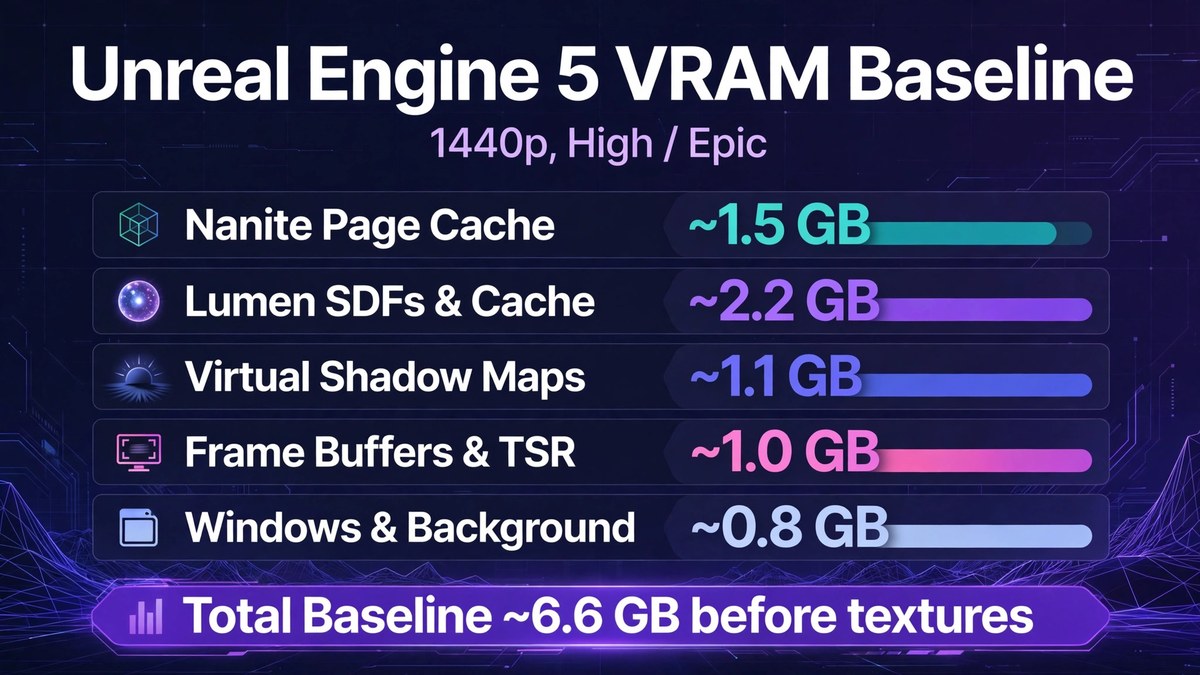
As the table demonstrates, before the game even begins to load the high-resolution Albedo, Normal, and Roughness texture maps required to make the environment look realistic, the engine has already consumed 6.6GB of memory. On an 8GB graphics card, this leaves a paltry 1.4GB of VRAM remaining for the actual textures. This is the exact mathematical reason why Unreal Engine 5 games frequently suffer from “muddy” or blurry textures on 8GB GPUs. The engine’s memory manager realizes there is no space left, and forces the texture streaming pool to only load the absolute lowest-quality, blurred proxy textures to prevent a fatal crash.
How to Optimize Unreal Engine 5 for 8GB Graphics Cards
If you are trying to survive the Unreal Engine 5 transition on an 8GB or 10GB graphics card, you cannot treat the in-game settings menus like you did in previous generations. Lowering the texture quality is no longer enough to guarantee smooth performance. You must actively target the virtualized systems that are hoarding your VRAM.
- Target Global Illumination First: Lumen is the biggest memory hog in UE5. Lowering the Global Illumination setting from “Epic” or “Ultra” down to “Medium” is the most effective way to claw back gigabytes of VRAM. Medium settings shrink the surface cache and the distance at which the engine tracks light bounces, drastically reducing memory load while keeping the core visual style intact.
- Step Down the Shadows: Virtual Shadow Maps scale heavily with resolution and quality settings. Dropping shadow quality to “Medium” reduces the size of the shadow pages held in memory. In dense forests or cities, this can immediately cure heavy frame-pacing stutters.
- Rely Heavily on Upscaling: Do not attempt to run Unreal Engine 5 titles at native resolutions unless you possess a 16GB or 24GB flagship graphics card. Use DLSS, FSR, or TSR on the “Quality” or “Balanced” presets. Upscaling lowers the internal rendering resolution, which subsequently lowers the memory footprint required for the Nanite Page Cache and Lumen SDFs.
- The `r.TextureStreamingPoolSize` Tweak: For advanced PC users, many UE5 games allow you to manually adjust engine variables via the
Engine.iniconfiguration file. If your textures are completely failing to load despite having VRAM available, you can force the engine to allocate more space for textures by adding the commandr.TextureStreamingPoolSize=3072(allocating exactly 3GB to textures). However, only do this if you have successfully lowered GI and Shadows to free up the baseline memory, otherwise, you will force the game to spill over into system memory and crash.
The Future of PC Gaming Hardware
Unreal Engine 5 is not an unoptimized engine; it is simply an engine built exclusively for the future. The virtualized architecture of Nanite and Lumen scales brilliantly, but it requires a strictly elevated hardware baseline to function properly. As more developers abandon older toolsets and migrate their projects to UE5 over the coming years, the hardware reality of PC gaming will permanently shift.
For PC builders targeting a 1080p monitor, 10GB to 12GB of VRAM must now be viewed as the standard recommendation to ensure a stutter-free experience. For gamers targeting 1440p and ultra-wide resolutions, 16GB of VRAM is rapidly becoming mandatory to maintain the massive caching pools required for high-fidelity ray tracing and virtual geometry. The 8GB graphics card had an incredible, decade-long run as the champion of the mainstream PC market, but the architectural requirements of Unreal Engine 5 have firmly and permanently retired it to the history books.