8GB vs 16GB VRAM at 1440p: Is Double the Memory Worth It?
Introduction
A 1440p monitor is a popular upgrade for PC players who want a sharper image than 1080p without taking on the full rendering cost of 4K. The resolution is demanding enough to make graphics-card selection important, and VRAM capacity is part of that decision. An 8GB graphics card and a 16GB graphics card may both support 1440p output, but their ability to handle demanding games, high-resolution assets, and future workloads can be different.
The obvious question is whether doubling the memory produces a meaningful gaming improvement. The answer is conditional. If a game and its chosen settings fit comfortably inside 8GB, a 16GB card does not automatically deliver twice the frame rate or even a visible improvement. If the workload exceeds the smaller card's practical memory budget, extra capacity can help the game retain more resources and avoid some forms of memory pressure.
Capacity must also be separated from GPU performance. Many 8GB and 16GB cards use different chips, core configurations, memory buses, and power limits. A benchmark between two unrelated models is a comparison of complete graphics cards, not a controlled experiment isolating VRAM. This article explains how to interpret the difference and how to choose a card for 1440p gaming.
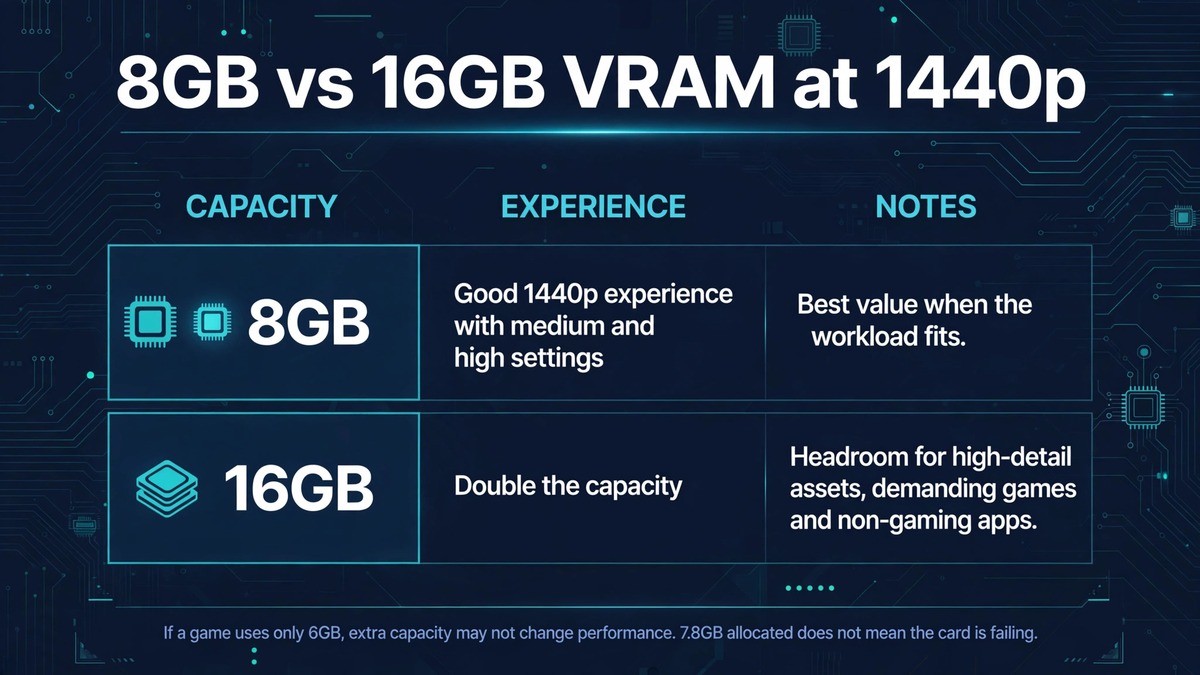
| Aspect | 8GB | 16GB |
|---|---|---|
| 1440p gaming | Can deliver a good experience with a mixture of medium and high settings | More room for high-detail assets, demanding games, and non-gaming applications |
| Frame rate | Depends on the GPU, not capacity alone | Does not automatically deliver twice the frame rate or even a visible improvement |
| Beyond gaming | Less headroom for other workloads | Useful for 3D scenes, video workflows, and local AI tools that need GPU memory |
Quick answer
For 1440p gaming, 8GB can still work in a range of titles when texture quality and advanced effects are selected sensibly. Sixteen gigabytes provides more headroom for demanding games, high-resolution texture assets, content creation, and certain GPU-accelerated applications. The additional capacity is most valuable when the workload genuinely needs it.
If two otherwise similar GPUs are available and one has 16GB rather than 8GB at a reasonable price difference, the larger capacity can be attractive for flexibility. If the 16GB model is substantially slower or much more expensive, do not assume memory alone justifies the purchase. Look for independent tests using the games, settings, and applications you care about.
Why 1440p changes the discussion
A 2560-by-1440 image contains more pixels than a 1920-by-1080 image. The GPU must process more pixels for many rendering operations, and some buffers scale with resolution. This can raise memory use, bandwidth demand, and shader workload. The increase is not identical for every resource: textures may be reused at different resolutions, while render targets and certain intermediate buffers are more directly tied to output dimensions.
The distinction matters because VRAM capacity and GPU speed solve different problems. A card may have enough memory to hold the required assets but lack the shader throughput to render them at a high frame rate. Another card may have enough raw processing power but struggle when a memory-heavy scene exceeds its practical resource budget.
At 1440p, texture quality is often a major setting to evaluate. Higher texture settings can make surfaces look more detailed without necessarily increasing the number of pixels rendered. This can make textures a useful quality option when the GPU has sufficient memory, but a potential source of pressure on a smaller card.
What does 8GB provide?
Eight gigabytes is a capacity, not a performance class. The actual experience depends on the graphics processor, memory bandwidth, driver, game engine, and settings. In many games, an 8GB card can deliver a good 1440p experience with a mixture of medium and high settings. Some titles may allow high textures, while others may require a reduction in texture quality or ray tracing.
A memory allocation reading close to 8GB should be interpreted carefully. Games can reserve memory for caching and streaming, and the reported figure may not represent the minimum amount needed to render the current frame. A card showing 7.8GB allocated is not automatically failing. More convincing signs of a capacity limitation include repeatable stutters, texture quality changes, asset pop-in, or performance that improves when memory-heavy settings are lowered.
The strongest case for 8GB is value. If a card is priced well, offers strong raster performance, and meets the player’s actual game requirements, it can remain a reasonable choice. Its limitation is reduced headroom for unusually demanding workloads and future titles that make heavier use of high-detail assets.
What does 16GB change?
Sixteen gigabytes doubles the nominal capacity. This can allow more texture assets and other graphics resources to remain resident, which may reduce the need for aggressive streaming in a memory-heavy workload. It can also make a card more flexible for applications beyond gaming, including 3D scenes, video workflows, and local AI tools that need GPU memory.
The benefit is not universal. If a game uses only 6GB under the selected settings, the extra capacity may not change performance. If the graphics processor is the limiting factor, more memory will not remove that bottleneck. A 16GB card with weaker processing hardware can be slower than a faster 8GB card in workloads that fit inside 8GB.
It is also important to avoid equating a 16GB allocation with a 16GB requirement. An engine may use available memory for caching when it has room. The fact that a larger card reports more memory use does not necessarily mean it needs that amount to deliver the same image quality.
Average FPS, 1% lows, and frame times
Average FPS is useful, but it is not a complete measure of smoothness. It summarizes performance over a test sequence and can hide brief interruptions. The 1% low attempts to describe slower frames, but results vary according to the measurement method and test duration. Frame-time graphs can reveal whether a game produces regular frames or occasional long delays.
When VRAM capacity is insufficient, the engine and driver may need to move resources between memory pools or stream them from storage. Depending on the system and game, this can contribute to inconsistent frame delivery. But a frame-time spike is not proof of a VRAM problem. Shader compilation, CPU scheduling, storage activity, background processes, and network events can also cause stutter.
A good comparison should show average FPS, a clearly defined low-percentile metric, frame-time plots, and notes about visible texture behavior. It should also identify the exact scene and route used. A single average number cannot explain whether extra memory improved the experience.
How to design a fair 8GB versus 16GB test
The cleanest experiment would compare two cards that are otherwise as similar as possible. Ideally, they share the same GPU architecture and similar processing resources, with memory capacity as the principal difference. Such pairs are not always available. If the cards use different GPU chips, state clearly that the results represent a product comparison rather than a pure capacity test.
Use the same CPU, motherboard, system RAM, storage, operating system, driver version, game build, and background applications. Record the exact graphics preset, texture setting, resolution, upscaling mode, ray-tracing configuration, and frame-generation status. Keep the test route identical and repeat it several times.
Measure more than the overlay’s VRAM allocation. Record average frame rate, low-percentile performance, frame times, GPU utilization, system RAM usage, and any visual anomalies. Capture screenshots or video when texture pop-in or quality changes are observed. If possible, test both a memory-light scene and a memory-heavy scene.
A useful additional step is to vary one setting at a time. For example, test high textures and then medium textures while leaving the other options unchanged. If the smaller card improves substantially and the larger card changes little, that may suggest the smaller card was under memory pressure. It is still important to rule out other effects, such as a change in GPU workload or a different rendering path.
Texture quality, ray tracing, and other settings
Texture quality is an obvious setting to investigate because high-resolution assets can consume more memory. However, the exact impact depends on the game engine and its asset pipeline. Some games stream textures efficiently, while others load large packages or provide optional high-resolution texture packs.
Ray tracing can add memory requirements through acceleration structures, additional buffers, denoising resources, and other data. The effect varies widely by title and implementation. It should not be assumed that enabling ray tracing always consumes a fixed amount of extra VRAM.
Shadow quality, resolution scale, high-resolution reflections, and large texture packs may also affect memory use. Test the options individually rather than lowering everything at once. That helps identify the setting that produces the best balance between visual quality and performance.
Is 16GB more future-proof?
More capacity can provide additional flexibility as games and creative applications evolve, but future-proofing is not guaranteed. A future game may require more processing power, newer rendering features, or better hardware support rather than simply more memory. A 16GB card can also become outdated if its GPU performance is insufficient for the desired settings.
The most sensible approach is to treat 16GB as useful headroom, not a promise of long-term high-end performance. Consider how long you plan to keep the card, whether you use texture modifications, whether you play at 1440p ultra settings, and whether you run non-gaming workloads. If those needs are modest, an 8GB card with stronger performance may be the better value.
Buying guidance
For a budget-focused 1440p system, compare real game benchmarks before deciding. An 8GB card may be suitable if it can maintain the frame rate you want and the games you play do not show memory-related problems at your preferred settings. Be prepared to adjust textures or ray tracing in demanding titles.
For a longer ownership period, a 16GB card can be attractive if its GPU performance, price, power consumption, and feature support are competitive. It is especially useful for people who also run local AI models, work with large 3D scenes, or use GPU-accelerated creative software.
Do not pay a large premium for capacity without checking the rest of the specification. Review the GPU architecture, core performance, memory bandwidth, bus width, power requirements, display outputs, encoder features, and driver support. The best purchase is the card that handles your actual workload at an appropriate total cost.
Frequently asked questions
Is 8GB VRAM enough for 1440p gaming?
It can be enough for many games, particularly with sensible texture and effects settings. Some demanding titles or high-resolution asset packs may require compromises. Check benchmarks for the exact GPU and game rather than relying on capacity alone.
Does 16GB VRAM give double the FPS of 8GB?
No. Capacity does not scale frame rate in that way. Extra memory can help when the smaller capacity is a real limitation, but it does not double shader throughput or memory bandwidth.
Is 16GB better for ray tracing?
It can provide more memory headroom, but ray-tracing performance also depends heavily on the GPU’s ray-tracing hardware, shader performance, and software implementation. Compare complete cards in the same game and settings.
Can an 8GB GPU use system RAM when VRAM fills up?
The operating system and driver can manage shared GPU memory, but system RAM is not equivalent to dedicated VRAM. Accessing resources outside local graphics memory can involve different bandwidth and latency characteristics and may affect performance.
Should I choose 16GB for AI as well as gaming?
If you plan to run local AI models, image-generation tools, or other GPU-accelerated applications, additional VRAM can be particularly useful. Check the memory requirements of the specific model, precision, batch size, and software stack.
Is 16GB enough for 4K gaming?
It may be sufficient for many 4K workloads, but capacity alone does not determine whether a card can render 4K smoothly. GPU processing power, memory bandwidth, settings, and the game itself remain important.
Conclusion
At 1440p, 8GB and 16GB are not competing frame-rate guarantees. They are different memory budgets. Eight gigabytes can deliver a good experience when the workload fits, while 16GB offers more room for high-detail assets, demanding games, and non-gaming applications. The value of the extra capacity depends on whether it solves a real limitation in the workloads you use.
Choose a graphics card by evaluating its complete performance, not by selecting the largest VRAM figure. Use repeatable benchmarks, inspect frame-time behavior, and test memory-heavy settings individually. That is the most reliable way to decide whether 16GB is worth paying for in your 1440p system.